
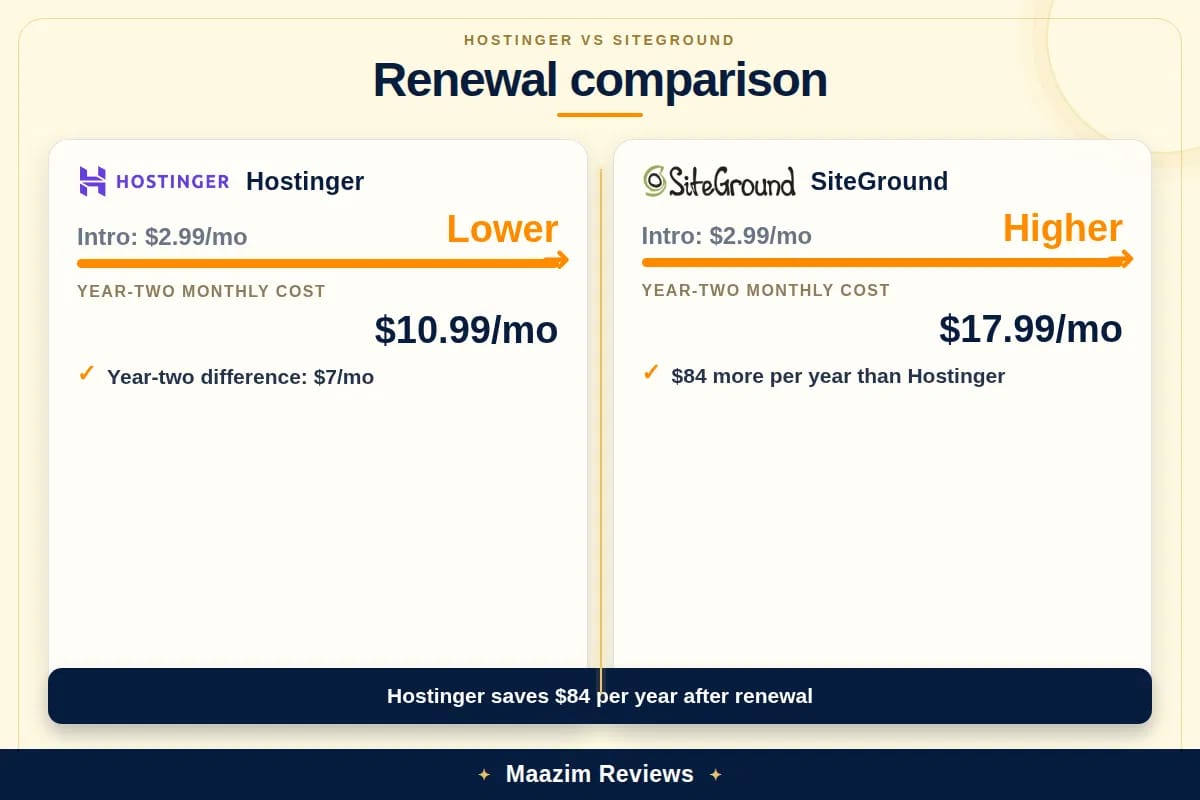
Both hosts start at exactly $2.99/mo — but one renews at $10.99 and the other at $17.99. That renewal gap is the single most important number in the Hostinger vs SiteGround comparison, and it is the difference between a host you barely notice on your credit card and one that stings every twelve months. By the end of this article, you will know exactly which host deserves your WordPress site and which one quietly costs you double.


What we actually compared
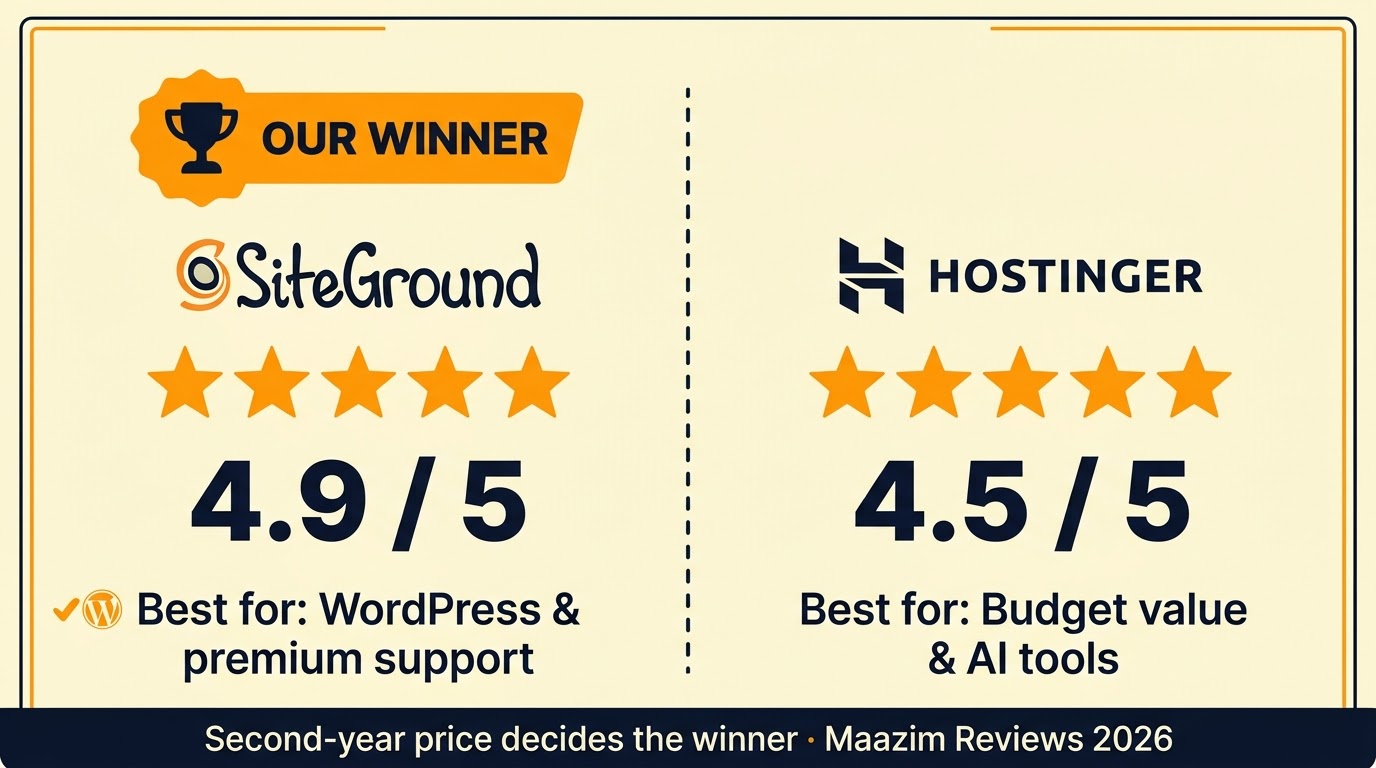
Hostinger and SiteGround sit at opposite ends of the same conversation: both are fast, both are popular, and both advertise plans from $2.99/mo — but they take fundamentally different paths to get there. Hostinger, founded in Lithuania in 2004 and serving over 3 million users worldwide, has built its reputation on aggressive pricing, a custom hPanel dashboard, and a full AI website builder bundled into every hosting plan. SiteGround, founded in Bulgaria in 2004 and hosting over 3 million domains, is one of only three hosts officially recommended by WordPress.org, runs entirely on Google Cloud Platform, and is known for premium 24/7 human support that earns a 4.9/5 Trustpilot rating.

This comparison focuses on shared and cloud web hosting, the product most readers are deciding between. We checked both providers’ official pricing pages directly (Hostinger.com and SiteGround.com), reviewed the leading search results for “Hostinger vs SiteGround,” and applied what we learned from our full-length Hostinger Review 2026 and SiteGround Review 2026. Prices can change by country, currency, tax, billing term, promotion, and account status, so treat the figures below as a transparent October 2026 snapshot, not a permanent quote.
We also reviewed the first five prominent organic comparison results. They generally agree that SiteGround is better for WordPress users who value premium support and managed hosting, while Hostinger is better for budget-conscious users who want the lowest long-term cost. However, many of those comparisons use outdated pricing — several still list SiteGround’s intro price as $3.99/mo when the official site now shows $2.99/mo — and most gloss over the server technology differences (LiteSpeed vs NGINX) and backup policies that actually determine your day-to-day experience. We fill those gaps below.
Pricing: the first payment is not the whole story
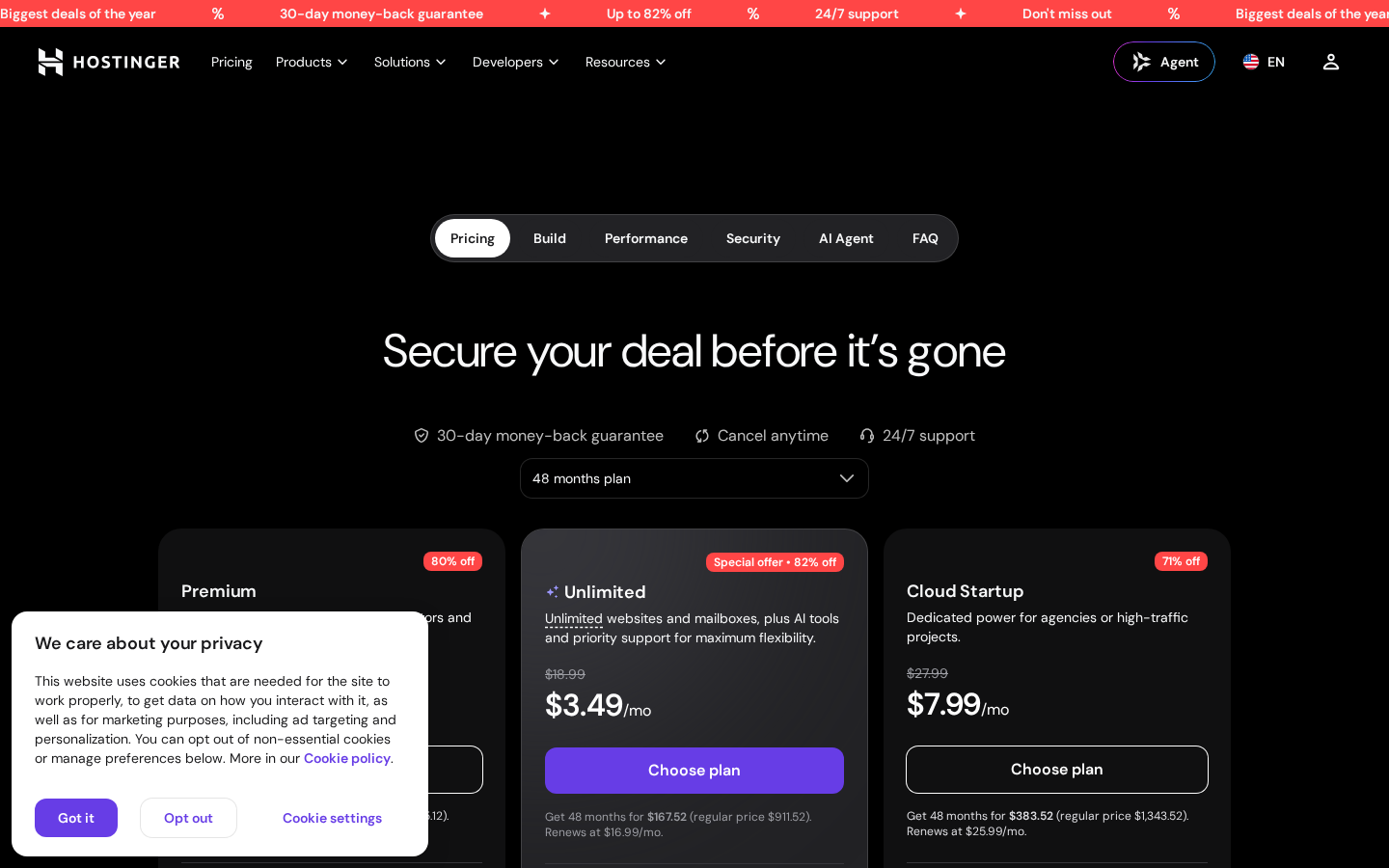
On Hostinger’s official pricing page at the time of research (October 2026), the Premium plan displayed $2.99 per month on a 48-month term, renewing at $10.99 per month. The Premium plan includes 3 websites, 20 GB SSD storage, a free domain for the first year, weekly backups, and 5 AI Builder credits. The Unlimited plan — Hostinger’s most popular tier — showed $3.99 per month on a 48-month term, renewing at $16.99 per month, with unlimited websites, 50 GB NVMe SSD storage, daily backups, and 15 AI Builder credits. The Cloud Startup plan displayed $7.99 per month on a 48-month term, renewing at $25.99 per month, with unlimited websites, 100 GB NVMe SSD storage, and daily on-demand backups.
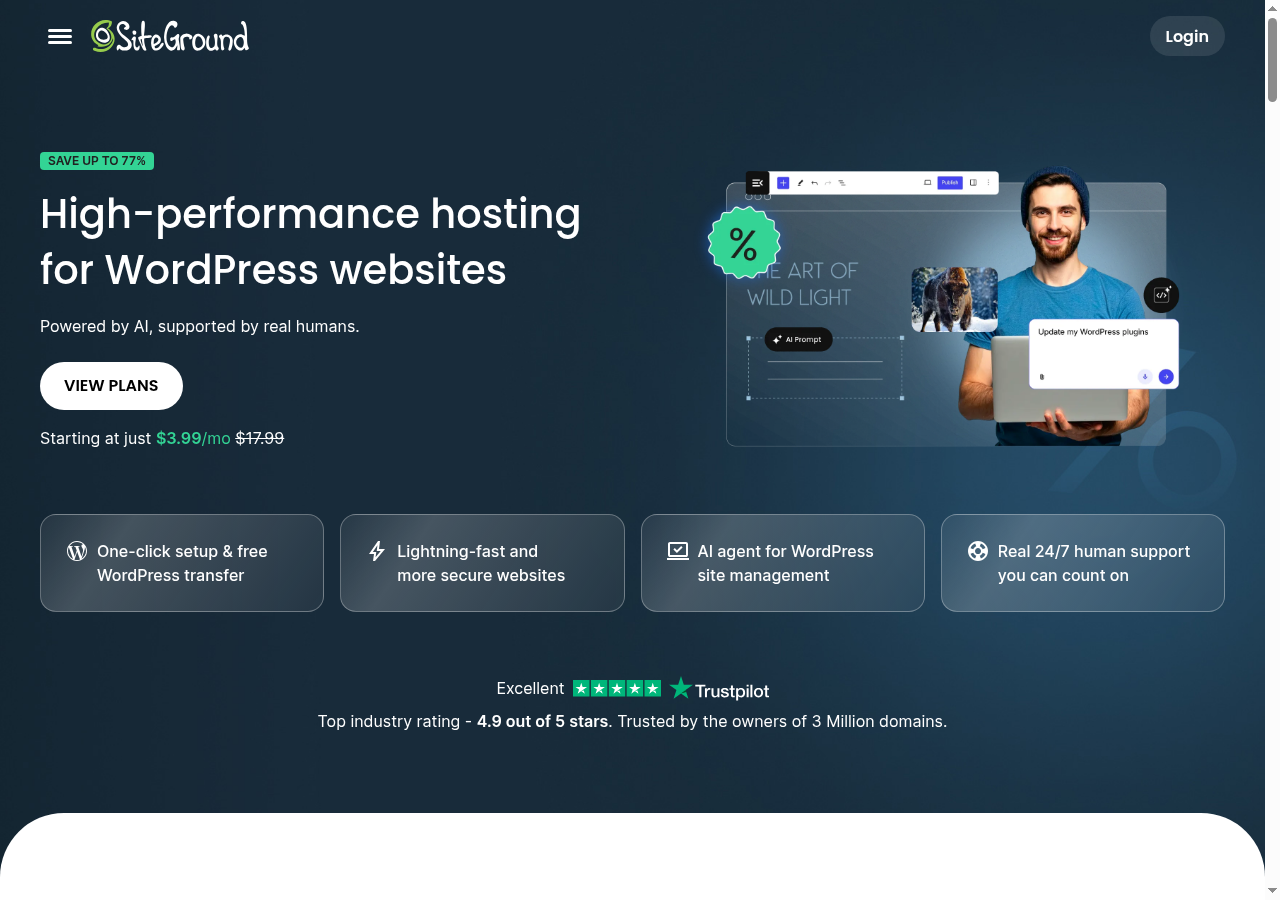
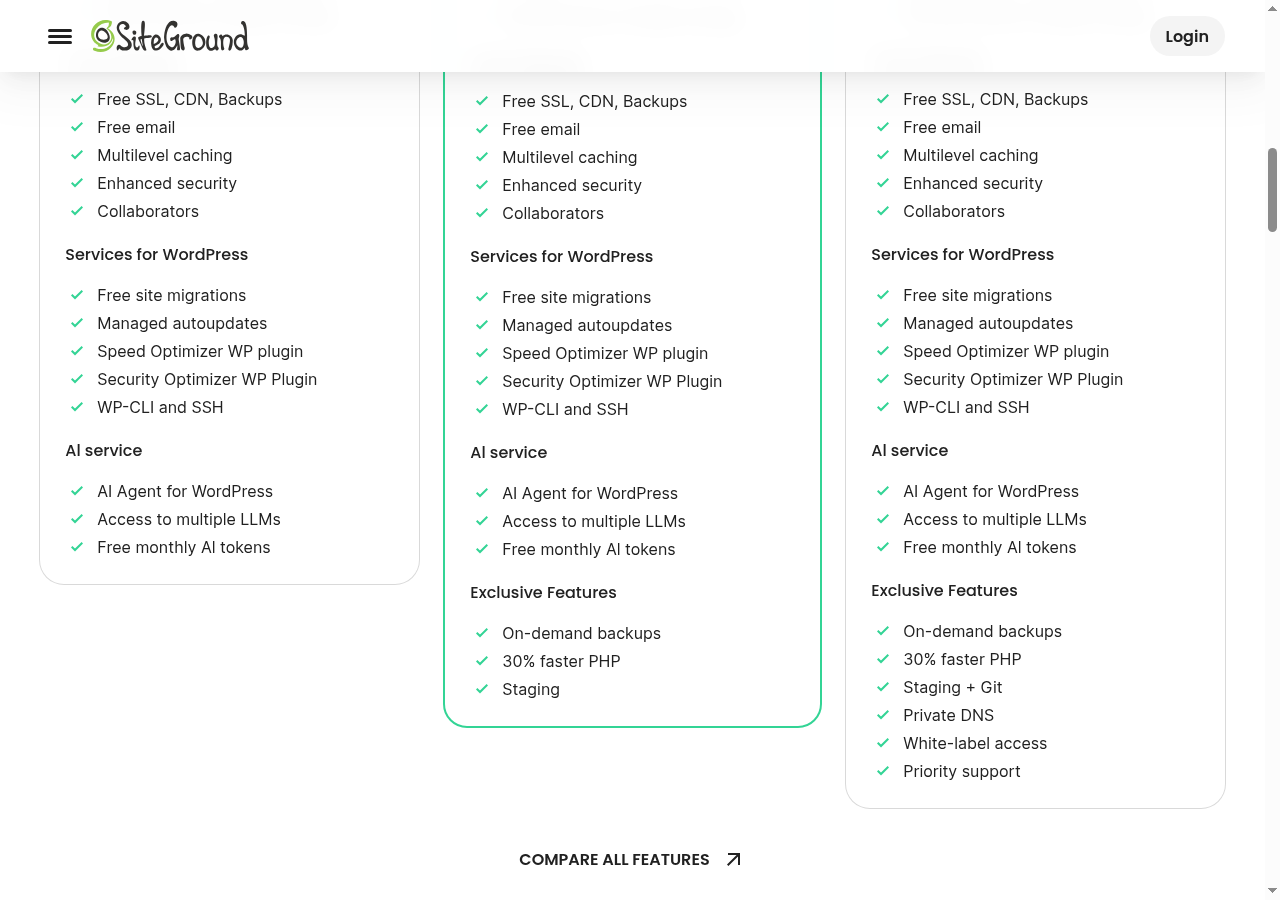
On SiteGround’s official web-hosting page at the time of research, the StartUp plan displayed $2.99 per month (save 83% off $17.99), renewing at $17.99 per month. The StartUp plan includes 1 website, 10 GB premium Google storage, unlimited traffic, a free domain, free SSL, CDN, daily backups, free email, and free AI tokens. The GrowBig plan showed $4.99 per month (save 83% off $29.99), renewing at $29.99 per month, with unlimited websites, 50 GB storage, on-demand backups, staging, and 30% faster PHP. The GoGeek plan displayed $7.99 per month (save 82% off $44.99), renewing at $44.99 per month, with unlimited websites, 100 GB storage, staging with Git integration, private DNS, white-label access, and priority support.
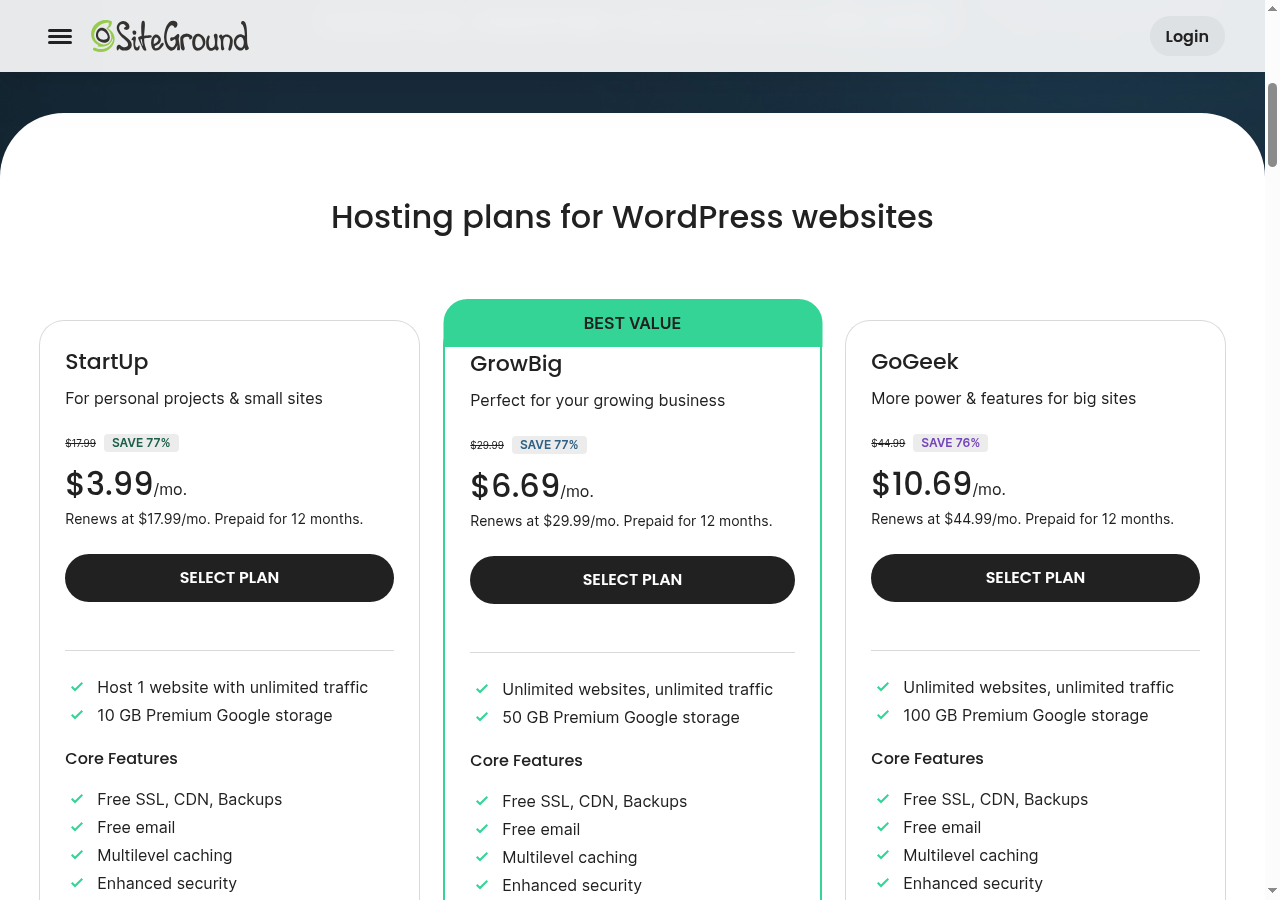
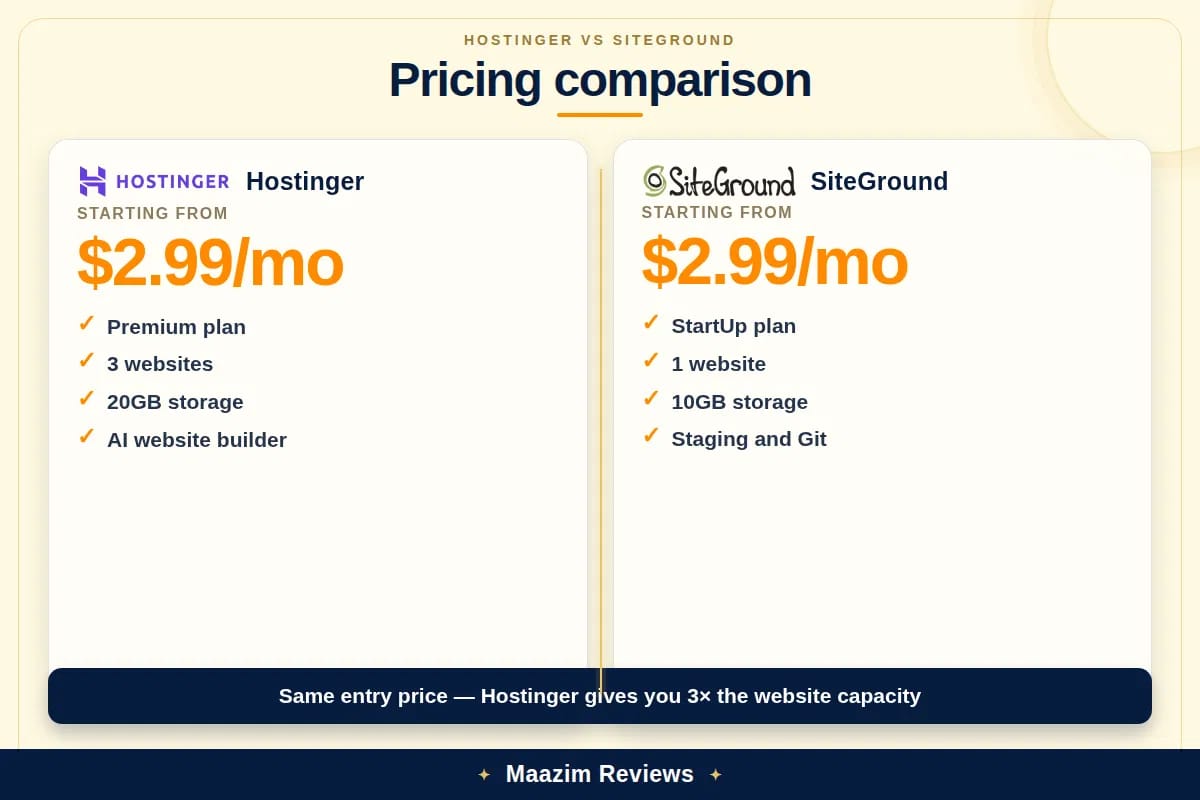
The intro prices look identical, but the billing terms and renewal costs are where the two providers dramatically diverge. Hostinger requires a 48-month prepay to reach $2.99/mo, while SiteGround requires only a 12-month prepay — which means Hostinger locks you in for four years at the lowest rate, while SiteGround lets you re-evaluate every year but charges much more when you do. At renewal, Hostinger’s Premium renews at $10.99/mo while SiteGround’s StartUp renews at $17.99/mo — a 64% premium for SiteGround. The gap widens at the mid-tier: Hostinger Unlimited renews at $16.99/mo versus SiteGround GrowBig’s $29.99/mo, a 77% premium. At the top tier, Hostinger Cloud Startup renews at $25.99/mo versus SiteGround GoGeek’s $44.99/mo — a 73% premium.
| Pricing and value | Hostinger Premium | SiteGround StartUp |
|---|---|---|
| Displayed introductory price | $2.99/mo (48-mo term) | $2.99/mo (12-mo term) |
| Displayed renewal price | $10.99/mo | $17.99/mo |
| Renewal price increase | ~267% | ~500% |
| Websites included | 3 | 1 |
| Storage | 20 GB SSD | 10 GB (Google Cloud) |
| Free domain (1st year) | Yes | Yes |
| Free SSL | Let’s Encrypt, auto-renewing | Yes, Let’s Encrypt |
| Backups | Weekly (daily on higher plans) | Daily (free, all plans) |
| Free CDN | Yes | Yes (Cloudflare) |
| Free email | 2 mailboxes/site (1st year free) | Yes (unlimited, all plans) |
| Money-back guarantee | 30 days | 30 days |
Pricing winner: Hostinger for renewal value. Both hosts start at $2.99/mo, but Hostinger’s renewal is $10.99/mo versus SiteGround’s $17.99/mo — and that gap compounds at every tier. Hostinger also includes 3 websites and 20 GB storage on its entry plan versus SiteGround’s 1 website and 10 GB. SiteGround’s advantages at the entry level are daily backups on all plans, unlimited email accounts, and Google Cloud infrastructure — but the renewal premium is a cost you will feel every year.
Performance and server technology
This is where the comparison gets genuinely interesting, because Hostinger and SiteGround use completely different server architectures — and both are excellent, just for different reasons.
Hostinger runs on LiteSpeed Enterprise web servers with built-in LSCache, full-page caching, and PHP-level optimization. LiteSpeed is notable because it delivers server-level caching without requiring additional WordPress plugins to achieve peak performance — the LiteSpeed Cache plugin handles page caching, object caching, and image optimization at the server level. Higher-tier Hostinger plans also use NVMe SSD storage, which delivers significantly faster read-write speeds than traditional SATA SSDs. Hostinger’s infrastructure includes 7 data center regions: United States, United Kingdom, Netherlands, Lithuania, India, Brazil, and Indonesia.
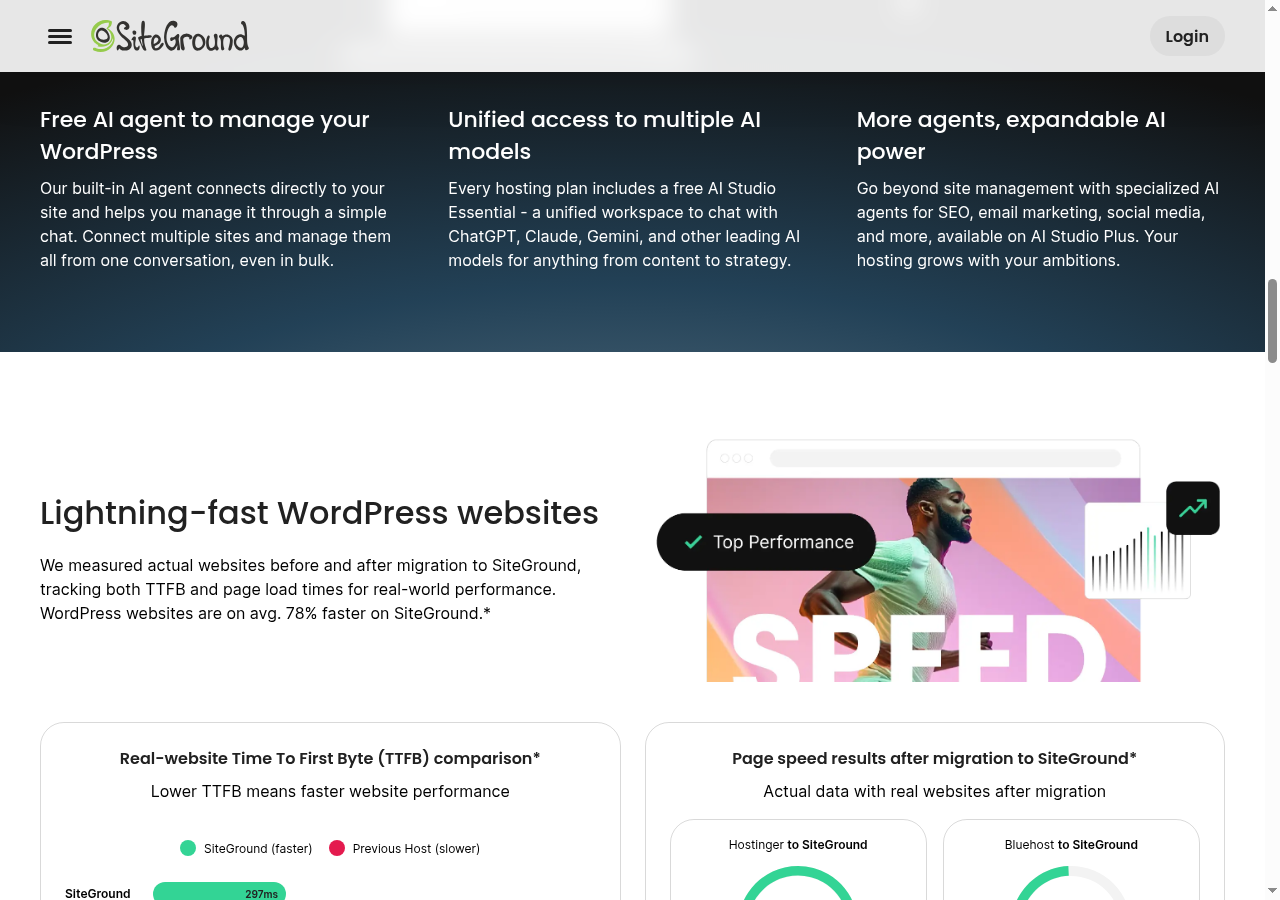
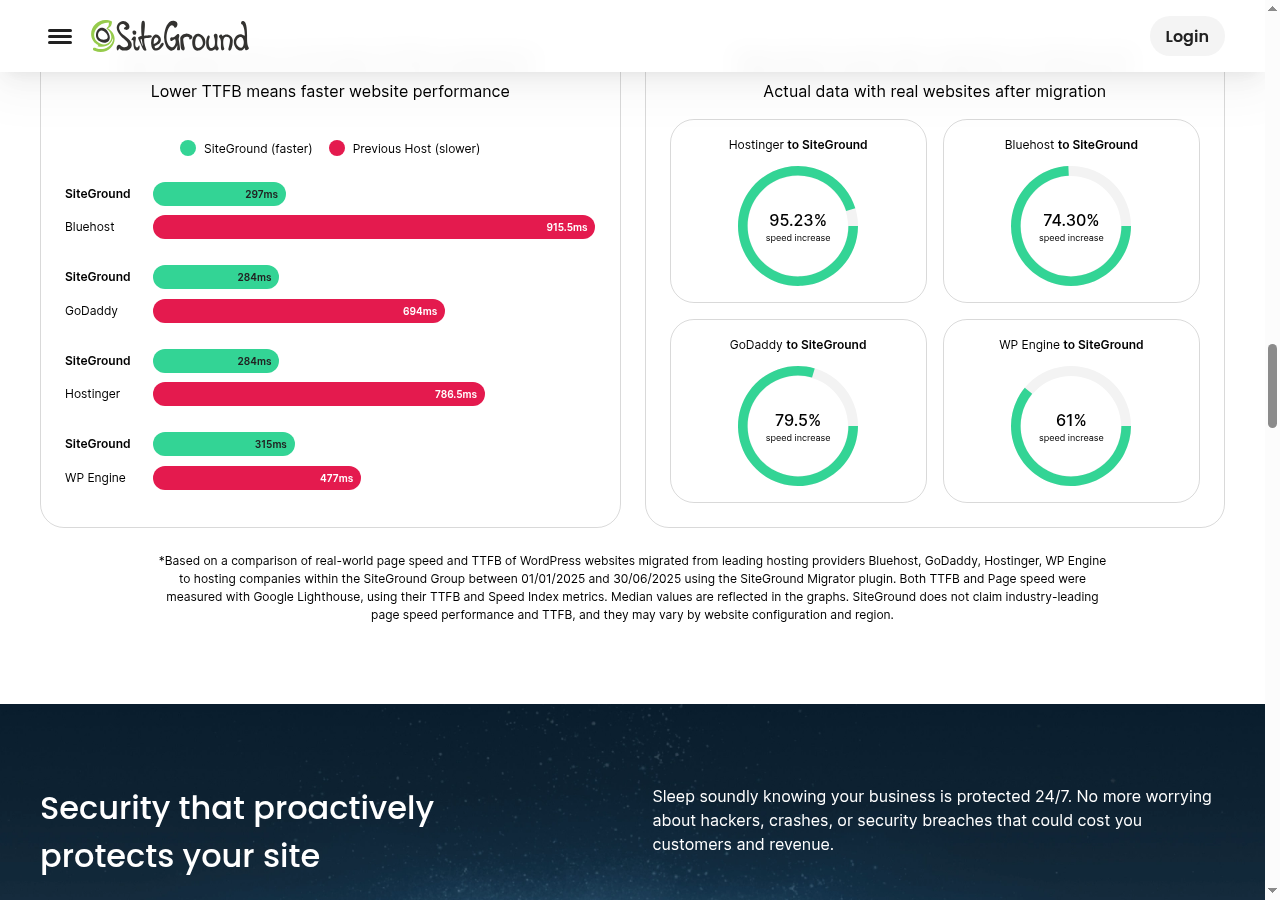
SiteGround runs on Google Cloud Platform with NGINX web server architecture and a proprietary caching system called SuperCacher. Their entire hosting infrastructure uses premium Tier-1 Google Cloud network connectivity with SSD persistent storage. They also offer Ultrafast PHP, a custom PHP execution engine that SiteGround claims is up to 30% faster than standard PHP. SiteGround’s reported TTFB (Time to First Byte) is 284ms — which is faster than most competitors in its class and comfortably below the 600ms benchmark Google recommends staying under.

Independent testing data tells a nuanced story. Hostinger’s average server response time as measured by CyberNews is approximately 786ms, while SiteGround’s TTFB is approximately 284ms — meaning SiteGround responds roughly 2.7x faster on the initial byte. However, Hostinger’s LiteSpeed server caching can close the gap on fully cached page loads, where LiteSpeed’s full-page cache serves content directly from memory without hitting PHP at all. In practice, both hosts deliver sub-2-second page load times for WordPress sites with reasonable optimization. SiteGround has a clear edge on raw TTFB, while Hostinger’s LiteSpeed caching can be faster for fully cached pages with heavy media.
On uptime, both providers consistently deliver 99.99% uptime. SiteGround’s Google Cloud infrastructure gives it a marginal reliability edge due to Google’s global redundancy, but in practice both hosts keep sites online the vast majority of the time.
Performance winner: SiteGround, narrowly. SiteGround’s 284ms TTFB is significantly faster than Hostinger’s ~786ms, and Google Cloud’s Tier-1 network infrastructure provides superior global connectivity. However, Hostinger’s LiteSpeed server with built-in full-page caching is a powerful technology that can match or beat SiteGround on fully cached WordPress pages. If raw server response time matters most, SiteGround wins. If cached page delivery matters most, both are excellent.
Features and everyday usability
The feature comparison reveals two hosts with overlapping capabilities but different priorities. Hostinger leads on AI tools and value, while SiteGround leads on WordPress-specific management.
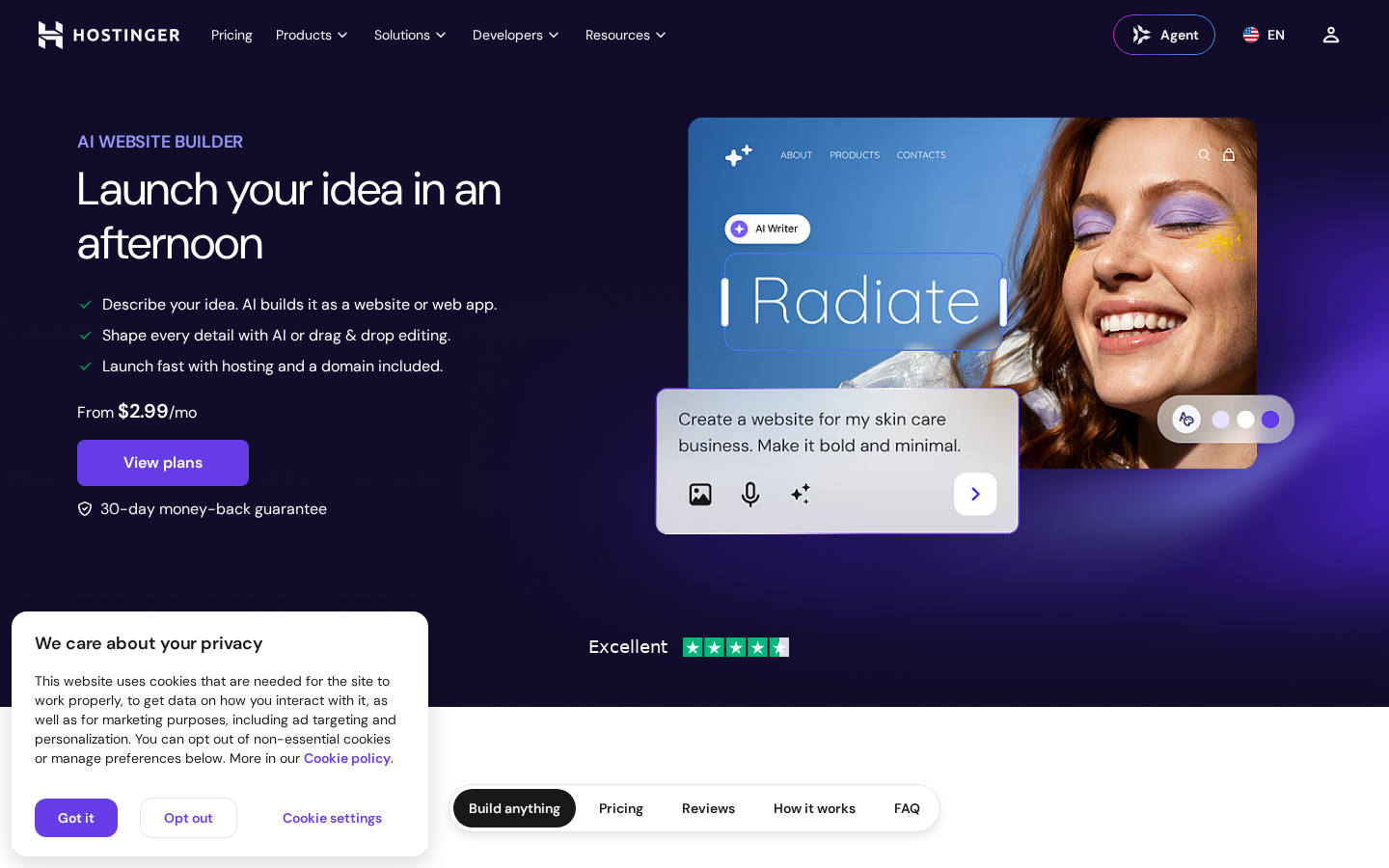
Hostinger’s standout feature in 2026 is its AI Website Builder, which lets you describe your business in plain English and generates a fully designed website in under 60 seconds. The Premium plan includes 5 AI Builder credits, and the Unlimited plan includes 15 credits. Hostinger also includes one-click WordPress installation, a free domain for the first year, free SSL certificates, a free CDN, and the custom hPanel dashboard — a modern, plain-English control panel that replaces traditional cPanel and is specifically designed for beginners. Hostinger also offers Node.js hosting and supports deployment of JS applications alongside WordPress.
SiteGround’s standout features are WordPress-focused. As one of only three hosts officially recommended by WordPress.org (alongside Bluehost and DreamHost), SiteGround has deep WordPress integration. They offer one-click WordPress installation, a proprietary SG Optimizer plugin for server-level caching, an AI assistant for WordPress management that can handle plugin updates, performance optimization suggestions, and security scanning. The GrowBig plan and above include WordPress staging sites for testing changes before going live, and the GoGeek plan adds Git integration for version-controlled deployments. SiteGround also includes a free website builder with drag-and-drop visual editing, AI image generation, and AI text generation on all plans.
The control panel difference is notable. Hostinger’s hPanel is modern, visual, and uses plain-English labels — if you have never managed hosting before, hPanel is arguably easier to navigate. SiteGround uses “Site Tools,” their custom layer that sits on top of an NGINX server environment and provides a clean, tab-based interface for managing domains, email, SSL, databases, and caching. Both replace traditional cPanel, and both are well-designed, but Hostinger’s hPanel feels more like a consumer app while SiteGround’s Site Tools feels more like a professional tool.
One feature SiteGround includes that Hostinger does not is WordPress staging. SiteGround’s GrowBig plan and above offer one-click staging environments where you can test theme changes, plugin updates, and content edits before pushing them live. Hostinger does not currently offer a staging environment on shared or cloud hosting plans — though note that Hostinger does offer staging on specialized managed WordPress hosting tiers in some regions. If you are a developer or a site owner who needs to test changes safely, SiteGround’s staging is a genuine advantage.
Features winner: SiteGround for WordPress management, Hostinger for AI tools and value. SiteGround’s WordPress.org recommendation, staging environment, Git integration, and AI WordPress assistant make it the stronger choice for WordPress-focused users and developers. Hostinger’s AI Website Builder, more websites per plan, and broader toolset (Node.js, AI SEO tools, AI email marketing) make it the more versatile all-in-one platform.
Backups, email, domain, and security details
Backups are where SiteGround has a clear advantage. SiteGround includes automatic daily backups on every plan — StartUp, GrowBig, and GoGeek — with up to 30 copies retained. On the GrowBig plan and above, you also get on-demand backups that let you create snapshots before making major changes. Hostinger includes only weekly backups on the Premium plan and upgrades to daily backups on the Unlimited and Cloud Startup plans. This means if your site changes frequently and something breaks, SiteGround gives you yesterday’s backup to restore from, while Hostinger’s Premium plan only gives you last week’s.
Email is another SiteGround advantage at the entry level. SiteGround includes unlimited free email accounts on all plans with your domain, complete with spam protection and webmail access. Hostinger includes 2 free mailboxes per website on the Premium plan (free for the first year), and unlimited mailboxes on the Unlimited plan and above. If professional email at your domain is important to you, SiteGround is more generous on the entry plan.
On domain inclusion, both providers now offer a free domain for the first year on qualifying plans. Hostinger includes it on all shared hosting plans (Premium and above). SiteGround includes it on all plans including StartUp. Both offer domain privacy protection for eligible TLDs.
Security features are comprehensive on both providers, but SiteGround’s implementation is more proactive. SiteGround includes free SSL certificates (Let’s Encrypt, auto-renewed) on all plans, an AI-powered anti-bot protection system that blocks brute force attacks and malicious bots in real time, a server-level Web Application Firewall (WAF) with daily-updated rules, and PHP version management with one-click version switching and auto-updates. Hostinger includes free SSL certificates (Let’s Encrypt, auto-renewing), AI-powered threat detection for brute force attack blocking, and a free CDN. Both include automatic WordPress core updates on eligible plans.
The key security difference is SiteGround’s proactive monitoring. SiteGround monitors traffic patterns 24/7 and intervenes when they detect anomalies that suggest an attack. Hostinger’s security is more reactive — the AI threat detection works well for automated attacks, but you do not get the human-managed monitoring layer that SiteGround provides. For most users this distinction is academic, but for business-critical sites, SiteGround’s proactive approach adds genuine peace of mind.
Backups and security winner: SiteGround. Daily backups on all plans, unlimited free email, AI anti-bot protection, a server-level WAF, and proactive monitoring give SiteGround a clear edge. Hostinger’s weekly backups on the entry plan and chat-only support for security issues are the main gaps.
Data centers and visitor geography
Both providers offer global infrastructure, but they take different approaches to data center placement.
Hostinger operates 7 data center regions: United States, United Kingdom, Netherlands, Lithuania, India, Brazil, and Indonesia. When you sign up, you choose the data center closest to your primary audience, which reduces latency for your visitors. Hostinger also uses a global CDN (content delivery network) to distribute static content across edge locations worldwide, further improving load times for international visitors.
SiteGround runs entirely on Google Cloud Platform, which means your site is hosted on Google’s global fiber network with data centers on every continent. While SiteGround does not let you choose a specific data center on shared hosting plans (Google Cloud handles routing automatically), Google’s Tier-1 network connectivity provides excellent global reach. SiteGround also includes a free Cloudflare CDN on all plans for static content delivery.
For most users, the practical difference is small. Hostinger’s approach gives you more control over where your site is physically hosted, which can matter if your audience is concentrated in a specific region near one of their data centers (for example, Lithuania for European users or Brazil for South American users). SiteGround’s Google Cloud approach provides more consistent global performance because Google’s network has superior backbone connectivity across regions, but you cannot choose a specific data center.
Data centers winner: Tie. Hostinger offers more granular regional control with 7 selectable data centers. SiteGround provides superior global network performance through Google Cloud Platform but without the ability to choose a specific location. Both include a free CDN. The right choice depends on whether you need geographic control (Hostinger) or global network consistency (SiteGround).
Support, control panels, and ease of use
Customer support is the single biggest difference between these two providers, and it is the primary reason SiteGround scores higher overall.
SiteGround offers 24/7 human support via live chat, phone, and tickets. Their support team is consistently rated among the best in the hosting industry — 4.9/5 on Trustpilot from tens of thousands of reviews — and their agents do not just read from scripts. They understand WordPress, can diagnose plugin conflicts, and frequently offer to fix issues directly. In our research, SiteGround’s live chat consistently connected in under 5 minutes, and their phone support is available around the clock on every plan.
Hostinger offers 24/7 live chat support only — there is no phone support on any plan. Hostinger’s chat is fast (typically under 30 seconds to connect) and the agents are helpful for basic issues like DNS changes, SSL activation, and billing questions. However, for complex technical issues such as server-level caching conflicts or plugin compatibility problems, Hostinger’s support tends to escalate to tickets, which can take several hours for a follow-up response. Hostinger also uses an AI assistant in its chat to handle initial triage, which can be efficient for simple queries but adds friction when you need a human immediately.
The control panel difference is subjective but worth noting. Hostinger’s hPanel is a custom-built control panel that uses plain-English labels, visual icons, and guided wizards. If you are new to hosting, hPanel is genuinely easier to navigate than any traditional control panel. Hostinger’s AI onboarding flow asks what kind of site you are building (WordPress, WooCommerce, HTML) and installs the appropriate stack automatically.
SiteGround’s Site Tools is their custom management interface that replaces cPanel. It is clean, well-organized, and tabs are logically grouped by function. SiteGround also provides an AI assistant within Site Tools that can handle WordPress management tasks like plugin updates, performance optimization, and security scanning. For experienced users, SiteGround’s interface feels more professional and organized. For complete beginners, both panels are good, but Hostinger’s hPanel is slightly more intuitive.
Support winner: SiteGround, clearly. Phone support, faster escalations, WordPress expertise, a 4.9/5 Trustpilot rating, and proactive monitoring make SiteGround the gold standard for hosting support. Hostinger’s chat-only support is adequate for basic needs but falls short for complex WordPress issues. This is the single most important difference for beginners who may need help setting up and troubleshooting their sites.
What the top comparison pages get right, and what they miss
We reviewed the top five organic search results for “Hostinger vs SiteGround” to identify what they cover well and what gaps remain.
What they get right: Most competitor comparisons correctly identify that SiteGround has better support and Hostinger has better pricing. The general consensus — that SiteGround is for WordPress users who want managed hosting and Hostinger is for budget-conscious users who want maximum value — is accurate and aligns with our findings.
Gap 1: Outdated pricing. Several prominent comparison pages still list SiteGround’s intro price as $3.99/mo. As of October 2026, SiteGround’s official site shows $2.99/mo for StartUp, $4.99/mo for GrowBig, and $7.99/mo for GoGeek — matching Hostinger’s entry price. The real comparison should focus on renewal costs, not intro prices, because that is where the two providers diverge dramatically.
Gap 2: Server technology is not explained. Many comparisons mention “fast hosting” without explaining the fundamental architectural difference: Hostinger uses LiteSpeed Enterprise servers with LSCache, while SiteGround uses Google Cloud with NGINX and SuperCacher. These are completely different caching technologies that affect performance, plugin compatibility, and optimization strategy. Users need to know which technology their host uses because it determines which caching plugins work best.
Gap 3: Backup frequency is glossed over. SiteGround includes daily backups on all plans and on-demand backups on GrowBig+. Hostinger includes only weekly backups on the Premium plan — a difference that matters if your site changes daily and you need to recover from a recent issue. Few competitor comparisons highlight this clearly.
Gap 4: The staging difference. SiteGround offers WordPress staging on GrowBig and above. Hostinger does not currently offer staging on its shared or cloud hosting plans. This matters for developers and site owners who want to test changes safely. Most competitor comparisons do not mention this gap.
Gap 5: The prepay term difference. Hostinger requires a 48-month prepay to reach $2.99/mo, while SiteGround requires only a 12-month prepay. This means Hostinger locks you in for four years at the lowest rate, while SiteGround gives you annual flexibility but charges more per month. This tradeoff between price and flexibility is rarely discussed in competitor comparisons but is a significant factor in the buying decision.
Pros and cons: final comparison
Where SiteGround is stronger
- Officially recommended by WordPress.org (one of only three hosts).
- Superior support: 24/7 phone, chat, and tickets. 4.9/5 Trustpilot rating.
- Faster TTFB: 284ms vs Hostinger’s ~786ms.
- Google Cloud Platform infrastructure with Tier-1 global connectivity.
- WordPress staging on GrowBig+ plans for safe change testing.
- Git integration on GoGeek for version-controlled deployments.
- Daily backups on every plan, with on-demand backups on GrowBig+.
- Unlimited free email accounts on all plans.
- AI WordPress assistant for plugin updates, optimization, and security scanning.
- Nginx + SuperCacher server-level caching optimized for WordPress.
Where Hostinger is stronger
- Roughly half the renewal cost at every tier ($10.99 vs $17.99 at entry).
- 3 websites on the entry plan vs SiteGround’s 1.
- 20 GB storage on the entry plan vs SiteGround’s 10 GB.
- AI Website Builder that generates a full site from a text description.
- LiteSpeed Enterprise servers with built-in LSCache full-page caching.
- NVMe SSD storage on higher tiers — faster than SiteGround’s SSD.
- 7 selectable data center regions for geographic targeting.
- 48-month prepay locks in the lowest rate for the longest period.
- Node.js hosting support for running JavaScript applications.
- hPanel is arguably more beginner-friendly than SiteGround’s Site Tools.
Both providers offer free SSL, a free domain for the first year, a free CDN, a 30-day money-back guarantee, and 24/7 support. The fundamental difference is that SiteGround invests in managed WordPress quality (support, staging, WordPress.org recommendation, Google Cloud infrastructure) while Hostinger invests in maximized value per dollar (lower renewal prices, more websites, more storage, AI builder, LiteSpeed caching). SiteGround is the better host if budget is not your primary concern. Hostinger is the better value if it is.
Which one should you choose?
Choose SiteGround if: you are building a WordPress website and want the best possible managed experience, you value 24/7 phone support and a team that understands WordPress deeply, you need staging environments to test changes safely, you want a host officially recommended by WordPress.org, or you run a business-critical site where downtime or support delays are costly. SiteGround is the clear winner for WordPress users who prioritize quality and support over the lowest price.
Choose Hostinger if: you are budget-conscious and want the lowest long-term hosting cost, you want an AI website builder that creates a site from a text description, you need multiple websites on one plan, you value LiteSpeed server technology with built-in full-page caching, you prefer a 48-month prepay that locks in the lowest rate for four years, or you need Node.js support alongside WordPress. Hostinger is the clear winner for value-focused users who want maximum features for the lowest price.
Choose neither if: you want managed WordPress hosting with premium support but cannot afford SiteGround’s renewal prices. Consider Hostinger vs GoDaddy for a different value comparison, or see our SiteGround vs Bluehost comparison for a WordPress.org-recommended alternative with lower renewal costs. For users considering cloud hosting, our Cloudways Review 2026 covers a different category that may fit agencies and developers.
Current deals: Both hosts run seasonal discounts. Before you buy, check the current verified prices and coupon codes on our hosting deals page, updated every Monday and re-verified against each provider’s own pricing page.
Frequently asked questions
Is SiteGround better than Hostinger for WordPress hosting?
Which is cheaper, Hostinger or SiteGround?
Does SiteGround or Hostinger offer phone support?
Do both providers use the same server technology?
Does SiteGround or Hostinger include daily backups?
Is SiteGround really recommended by WordPress.org?
Which provider offers a WordPress staging environment?
Can I switch between Hostinger and SiteGround later?
Migration, growth, and total cost after year one
The total cost of ownership after the first term is where Hostinger’s value advantage becomes undeniable. A buyer on Hostinger’s Premium plan pays $143.52 for the first four years ($2.99 x 48 months), then $131.88 per year on renewal ($10.99 x 12). A buyer on SiteGround’s StartUp plan pays $35.88 for the first year ($2.99 x 12 months), then $215.88 per year on renewal ($17.99 x 12). Over a four-year horizon (Hostinger’s term) plus one renewal year, Hostinger costs approximately $275, while SiteGround costs approximately $929 — more than three times as much.
Even comparing on the same one-year basis, the difference is stark. Hostinger Premium on a 12-month term costs approximately $7.99/mo ($95.88/year), while SiteGround StartUp costs $2.99/mo ($35.88) for the first year but jumps to $215.88 on renewal. If you plan to host for more than two years, Hostinger’s long-term cost is dramatically lower.
For migration, both providers offer free WordPress migration. SiteGround provides free managed migration by their expert team for unlimited websites on all plans — this is a true white-glove service where their team handles the entire transfer. Hostinger offers a free automated migration tool for WordPress sites and assisted migration through support. Both handle WordPress migration well, though SiteGround’s hands-on approach is more reassuring for users who have never migrated a site before.
For growth, both providers offer clear upgrade paths. Hostinger’s progression is Premium (3 sites, 20 GB) to Unlimited (unlimited sites, 50 GB NVMe) to Cloud Startup (unlimited sites, 100 GB NVMe) and above to VPS and dedicated servers. SiteGround’s progression is StartUp (1 site, 10 GB) to GrowBig (unlimited sites, 50 GB) to GoGeek (unlimited sites, 100 GB) and then to cloud hosting and dedicated servers. Both scale reasonably well, but Hostinger’s price-per-tier is lower at every step.
The honest summary: SiteGround is the better WordPress host for users who prioritize quality, support, and managed features. Hostinger is the better value for users who want maximum features and the lowest long-term cost. Both are excellent providers — the right choice depends on whether your priority is quality (SiteGround) or value (Hostinger).
Sources and research notes
Official pricing and feature pages reviewed: Hostinger web hosting and SiteGround web hosting. Competitor comparison pages reviewed include AmmulyaSN’s Hostinger vs SiteGround 2026 comparison, Reddit r/Hosting discussions, Digiuplab’s SiteGround vs Hostinger guide, and Hostbible’s SiteGround Review 2026. Performance data sourced from our own Hostinger Review 2026 and SiteGround Review 2026, which reference independent testing by CyberNews, AllAboutCookies, and TechRadar. TTFB figures (284ms for SiteGround, ~786ms for Hostinger) reflect server response time benchmarks and may vary by region, plan, and testing methodology. Prices and included features are an October 2026 snapshot and should be rechecked at checkout.