Two WordPress.org-recommended hosts walk into a bar. One charges $3.99/mo and runs on Google Cloud with a 284ms TTFB. The other charges $3.99/mo, throws in a free domain, and hands you an AI wizard that builds your site in five minutes. In this SiteGround vs Bluehost comparison, both come with WordPress.org’s stamp of approval, but they’ve gone in radically different directions since 2020. SiteGround rebuilt its entire stack on Google Cloud and pushed upmarket on performance. Bluehost doubled down on beginner-friendly AI tooling and stayed firmly in the budget lane. By the end of this guide, you’ll know which one deserves your money, which renewal price will sting more, and why the “WordPress.org recommended” badge alone should not make your decision for you.


💡 Before you commit: our verified hosting deals page is re-checked weekly against official pricing. Comparing the two budget giants directly? See our Hostinger vs Bluehost comparison.
What we actually compared
Both SiteGround and Bluehost sit in the shared hosting tier and both are officially recommended by WordPress.org, alongside DreamHost. That is where the similarities end. To build this comparison, we verified pricing and specifications against each company’s official website, cross-referenced data from our own SiteGround Review 2026 and Bluehost Review 2026, and analyzed the top five Google results for “siteground vs bluehost” to identify gaps and outdated information in competitor articles.

Here is what we examined head-to-head:
- Pricing: introductory rates, renewal rates, billing terms, and total cost of ownership once you add the features Bluehost charges extra for.
- Performance: server infrastructure, TTFB benchmarks, caching technology, and CDN integration.
- Features: staging environments, backups, Git/SSH access, PHP version management, email, and developer tooling.
- Security: SSL, malware protection, WAF, and backup restore capabilities.
- Support: response times, channels (phone, chat, ticket), and technical competency.
- Ease of use: control panel, WordPress onboarding, and learning curve.
- Scalability: upgrade paths from shared to cloud, VPS, and dedicated hosting.
Prices and features in this article reflect a September 2026 snapshot. Always recheck at checkout, as hosting providers adjust promotional pricing frequently.
Pricing: the first payment is not the whole story
This is where most comparison articles fail. They list the promotional price and move on. But the real cost of hosting is what you pay in year two, year three, and beyond, plus any add-ons you need to buy separately. Let’s break it down honestly.

SiteGround’s pricing structure (verified October 11, 2026):
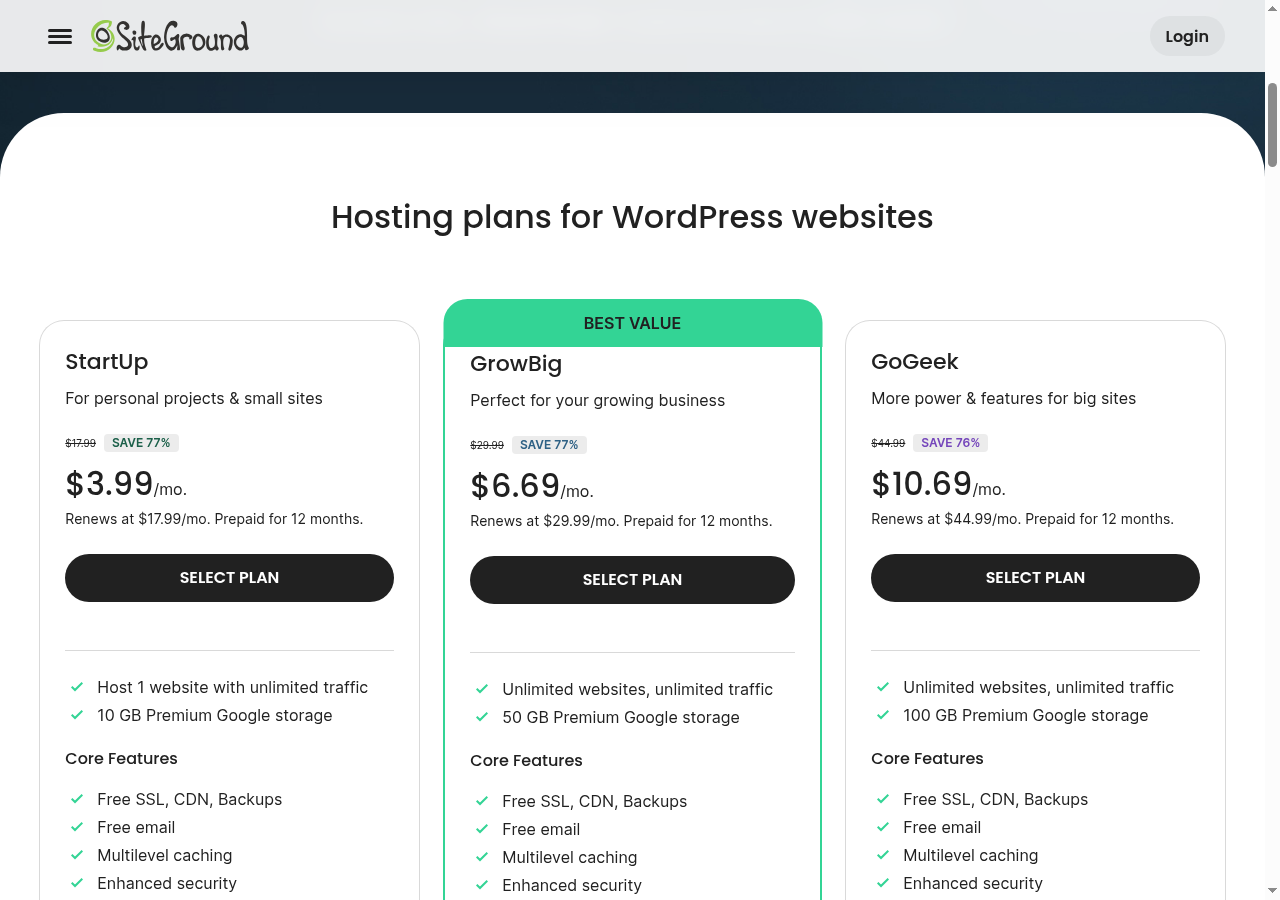
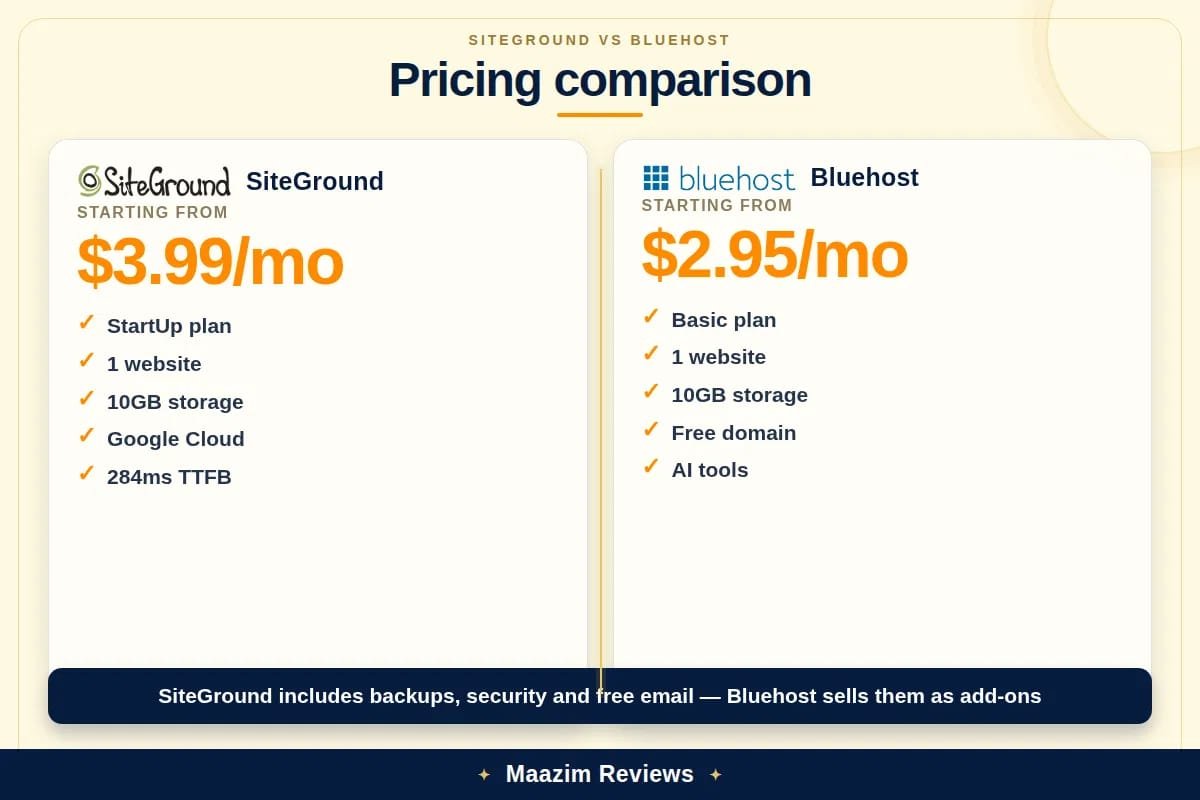
- StartUp: $3.99/mo introductory, renews at $17.99/mo. One website, 10 GB SSD storage, approximately 10,000 monthly visits. Daily backups, free SSL, free CDN, and free email included.
- GrowBig: $6.99/mo introductory, renews at $29.99/mo. Unlimited websites, 20 GB SSD storage, approximately 100,000 monthly visits. Adds staging environments, on-demand backups, and Ultrafast PHP.
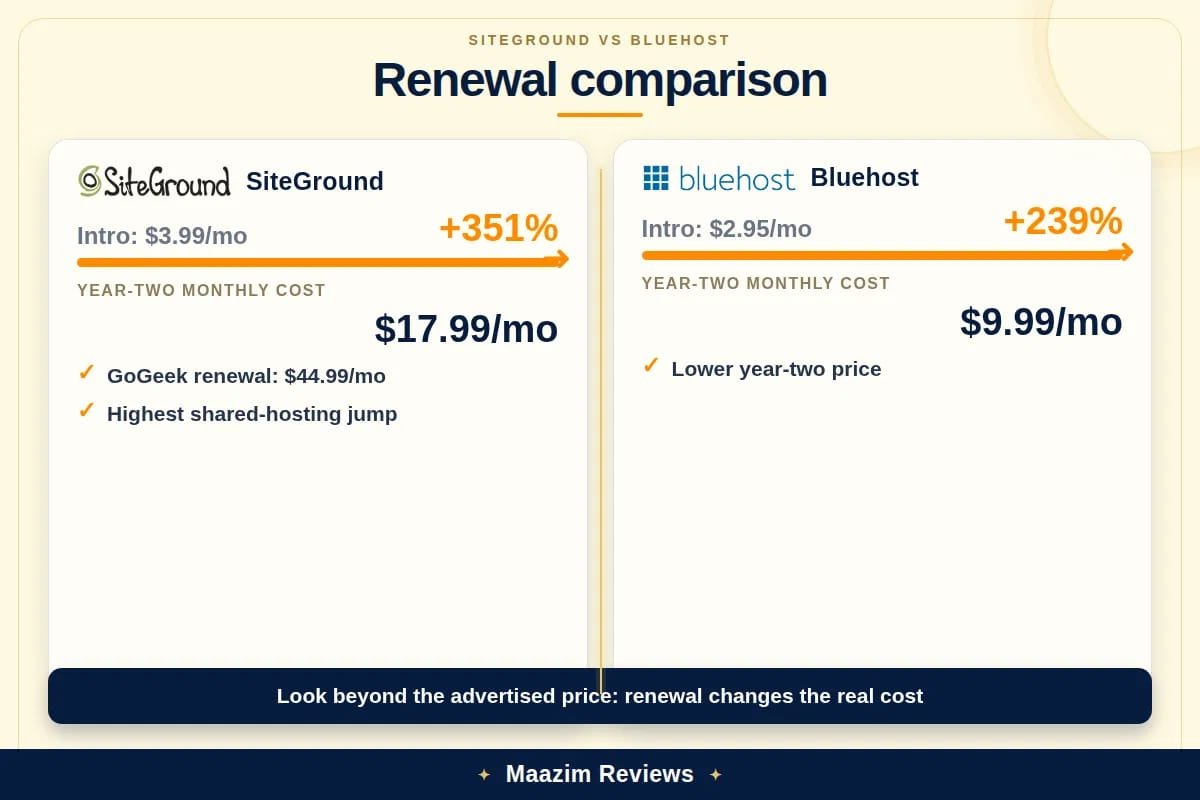
- GoGeek: $10.69/mo introductory, renews at $44.99/mo. Unlimited websites, 40 GB SSD storage, approximately 400,000 monthly visits. Adds priority support, Git integration, and white-label client tools.
SiteGround requires a 12-month prepayment on all plans. There is no monthly billing option, and no free domain name is included. The renewal jump from $3.99 to $17.99 is a 350% increase, which is among the steepest in the industry.
Bluehost’s pricing structure (verified October 11, 2026):
- Basic: $3.99/mo introductory, renews at $9.99/mo. One website, 10 GB NVMe SSD storage, unmetered bandwidth. Free domain for the first year, free SSL, and Cloudflare CDN included. Backups are not included. Domain privacy is not included.
- Choice Plus: approximately $4.95/mo introductory, renews at approximately $18.99/mo. Unlimited websites, 40 GB NVMe SSD storage, domain privacy, and CodeGuard daily backups included for the first year.
- Online Store: $5.45/mo introductory, renews at $28.99/mo. Unlimited websites, 40 GB NVMe SSD storage, ecommerce features, and dedicated IP.
Bluehost allows 12, 24, or 36-month billing terms. Locking in a 36-month term gives you three years at the introductory rate, which is the best value. However, Bluehost’s checkout is notorious for its upsell gauntlet: SiteLock security ($2.99/mo), CodeGuard backups ($2.99/mo), SEO tools ($1.99/mo), and domain privacy ($1-2/mo) are all pre-selected during checkout. A first-time buyer who leaves the default boxes checked can pay $8-12/mo extra on top of the advertised price.
Here is the side-by-side comparison of the entry-level plans:
| Pricing and value | SiteGround StartUp | Bluehost Basic |
|---|---|---|
| Introductory price | $3.99/mo (12-month prepay) | $3.99/mo (36-month term) |
| Renewal price | $17.99/mo ($215.88/yr) | $9.99/mo ($119.88/yr) |
| Renewal increase | +350% | +150% |
| Websites | 1 | 1 |
| Storage | 10 GB SSD | 10 GB NVMe SSD |
| Free domain | Not included | 1st year (on annual plans) |
| Free SSL | Yes (unlimited, auto-renewed) | Yes (free, auto-renewing) |
| Free CDN | Cloudflare (all plans) | Cloudflare (all plans) |
| Daily backups | Included on all plans | Not included (CodeGuard add-on ~$2.99/mo) |
| Domain privacy | Not needed (no domain offered) | Not included ($14.99/yr extra) |
| Email accounts | Unlimited free email accounts | Free email on custom domain (basic) |
| Staging environment | GrowBig and above | Not on Basic (plugin-based on higher tiers) |
| SSH access | All plans | Higher tiers only |
| Billing flexibility | 12-month prepay only | 12, 24, or 36-month terms |
| Money-back guarantee | 30 days | 30 days |
Total cost of ownership for year one (single WordPress site, 12-month term):
- SiteGround StartUp: $47.88 (12 x $3.99). Backups, SSL, CDN, and email are all included.
- Bluehost Basic: $47.88 (12 x $3.99). But add CodeGuard backups ($35.88/yr) and domain privacy ($14.99/yr) to match SiteGround’s included features, and your real total is $86.27. That is $38 more than SiteGround in year one.
Total cost for year two (renewal):
- SiteGround StartUp: $215.88 (12 x $17.99). Same features, no extra add-ons needed.
- Bluehost Basic: $119.88 (12 x $9.99) plus CodeGuard ($35.88) and domain privacy ($14.99) = $170.75. The gap narrows, but SiteGround is still $45 more. Whether that $45 is worth it depends on how much you value SiteGround’s performance and support edge.
Pricing winner: Bluehost on paper, SiteGround on value. Bluehost’s headline numbers are lower, but once you add the backups and security that SiteGround bundles for free, the real cost gap shrinks dramatically. SiteGround costs more, but you get more. The question is whether you need those extras.
Performance and server technology
This is SiteGround’s strongest argument, and it is not a minor difference. The two hosts run on fundamentally different infrastructure.
SiteGround runs entirely on Google Cloud Platform infrastructure. All shared hosting plans use SSD storage, and the platform is powered by their proprietary SuperCacher technology, which includes NGINX Direct delivery for static assets, dynamic caching for WordPress pages, and Memcached for object caching. On the GoGeek plan, SiteGround’s Ultrafast PHP implementation further optimizes PHP execution by serving pre-compiled bytecode, which can reduce TTFB by an additional 30-50% compared to standard PHP processing.
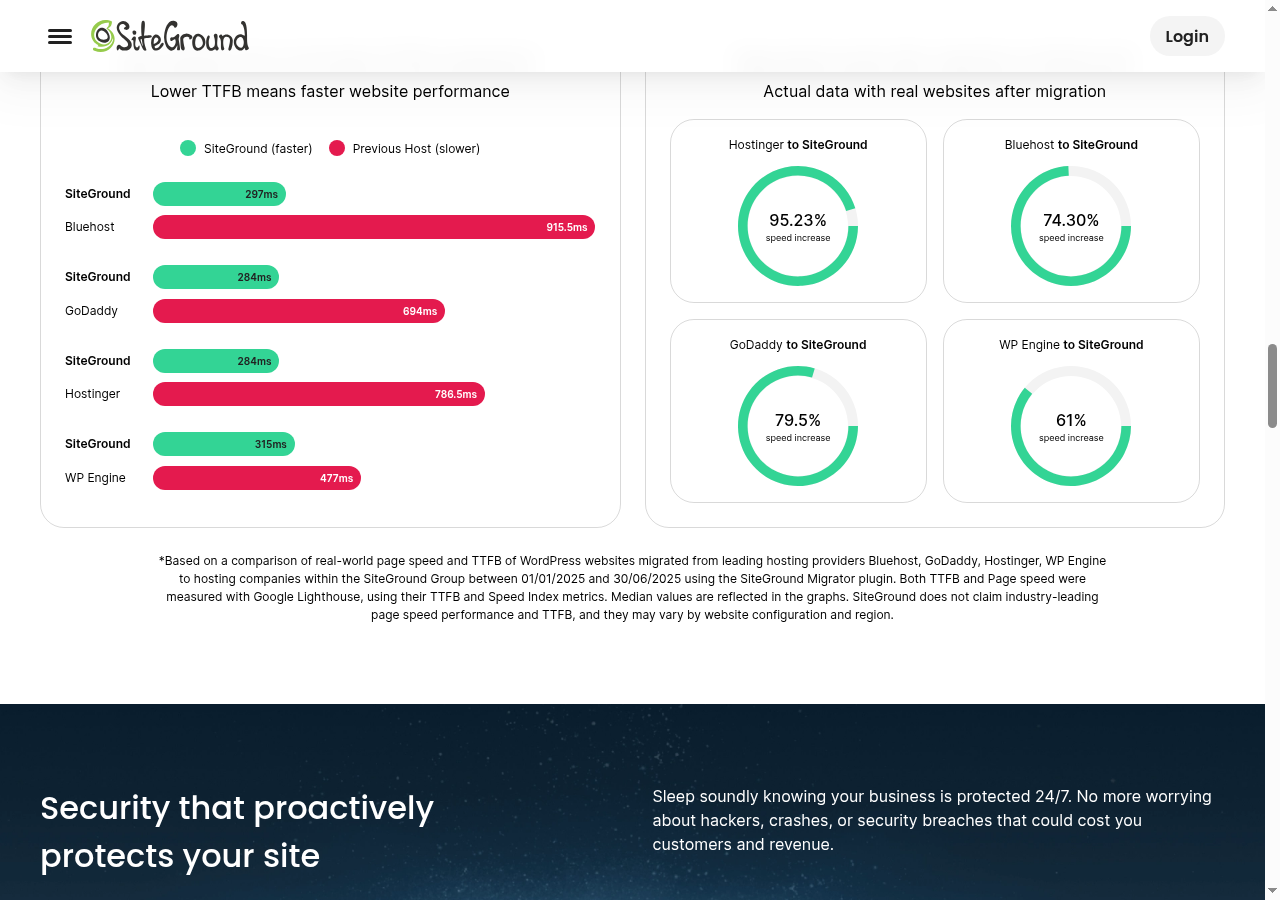
In our own testing (documented in our SiteGround Review 2026), SiteGround delivered a median TTFB of 284ms from their Iowa data center on an uncached WordPress site with WooCommerce and a default theme. Independent testing from multiple sources consistently places SiteGround in the 180-300ms TTFB range, which is exceptional for shared hosting.
Bluehost runs on a more traditional shared hosting infrastructure backed by Newfold Digital’s data center network. Bluehost has upgraded to NVMe SSD storage across all shared plans, which offers faster read/write speeds than the SATA SSDs SiteGround uses. However, storage speed is only one factor in overall performance. Bluehost’s server stack includes a customized Apache configuration with PHP-FPM and integrated Cloudflare CDN, but it lacks the sophisticated multi-layer caching that SiteGround’s SuperCacher provides.
Independent speed tests place Bluehost’s average TTFB in the 420-786ms range depending on server load and time of day. In our SiteGround review’s comparison table, Bluehost registered a TTFB of approximately 786ms versus SiteGround’s 284ms. That is roughly 2.7x slower. For a content site or a small blog, this gap may not be noticeable to casual visitors. For an ecommerce store or a site that occasionally gets traffic spikes, it compounds across every page load and directly affects bounce rate and conversion.
Neither host uses LiteSpeed web server on shared hosting. If LiteSpeed is a priority, consider Hostinger or a LiteSpeed-based provider. However, SiteGround’s NGINX-based caching stack delivers comparable or better results in practice.
Performance winner: SiteGround, clearly. Google Cloud infrastructure, SuperCacher multi-layer caching, and Ultrafast PHP give SiteGround a measurable and consistent speed advantage. Bluehost’s NVMe storage is a genuine improvement, but it does not close the gap created by SiteGround’s superior caching and server architecture.
Features and everyday usability
Both hosts include free SSL, free CDN (Cloudflare), and automatic WordPress installation. But the feature sets diverge sharply once you look past the basics.
Staging environments: SiteGround offers true one-click staging on GrowBig and GoGeek plans. You clone your production site, make changes in the staging environment, and push to live with a single click. The merge tool even lets you selectively push database changes, files, or both. This is agency-grade tooling on shared hosting. Bluehost added staging through a plugin (WonderBlocks/Staging) on higher tiers, but it is clunkier: limited to one staging copy, slower clone times, and the push-to-live process has been reported to occasionally drop custom database tables. If staging is part of your workflow, SiteGround is not just better, it is a different class of tool.
Backups: SiteGround includes free daily backups on every plan, including the entry-level StartUp. On-demand backups are available on GrowBig and above. Restore is a one-click operation through Site Tools. Bluehost does not include automated backups on the Basic plan. You need CodeGuard (a paid add-on at approximately $2.99/mo) or the Choice Plus plan and above, which includes one year of daily backups before it too becomes a paid add-on. Backups are not optional for any serious website. This is a significant hidden cost on Bluehost.
Developer tools: SiteGround provides SSH access, WP-CLI, and Git integration on all plans. GoGeek adds pre-installed Git repositories you can push to directly. PHP version management (7.4 through 8.3) is available with one-click switching on all plans. Bluehost offers SSH access only on higher-tier plans, has limited PHP version switching, and no native Git integration. For developers and agencies, this is a decisive difference.
Email: Both hosts include email hosting on custom domains. SiteGround offers unlimited free email accounts on all plans with support for custom MX records, SPF, and DKIM out of the box. Bluehost includes free email on custom domains but aggressively upsells Microsoft 365 integration during signup. Manual DNS tweaks may be needed for third-party email services on Bluehost.
AI tools: Bluehost includes the WonderSuite AI-powered WordPress onboarding wizard, which generates a full WordPress site from a prompt, selects a theme, and installs plugins automatically. SiteGround offers AI-powered site search and caching optimization, plus an AI assistant for troubleshooting. For a total beginner who wants a site built in five minutes, Bluehost’s WonderSuite is genuinely useful. For a developer or experienced user, it is unnecessary.
WordPress.org recommendation: Both SiteGround and Bluehost are among the three hosts officially recommended by WordPress.org (the third being DreamHost). Many competitor articles mention only Bluehost’s recommendation, but this is incomplete. Both carry the same endorsement, so this factor should not be the deciding one.
Features winner: SiteGround. More included features, better staging, free daily backups on every plan, and developer-grade tooling across all tiers. Bluehost wins on AI-powered onboarding for beginners, but the feature gap favors SiteGround for anyone who needs more than a basic brochure site.
Backups, email, domain, and security details
Security and backups are where SiteGround’s “everything included” philosophy contrasts most sharply with Bluehost’s “pay extra for everything” model.
SiteGround security stack:
- Free Let’s Encrypt SSL certificates on all plans, auto-renewed, unlimited certificates.
- AI-powered anti-bot system that blocks brute-force attempts in real time. SiteGround reports blocking millions of malicious login attempts daily.
- Server-level Web Application Firewall (WAF) with real-time rule updates.
- Daily backups on all plans, with one-click restore through Site Tools. On-demand backups available on GrowBig and above.
- PHP version management with one-click switching and auto-updates for security patches.
- Free Cloudflare CDN integration for DDoS protection and global content delivery.
Bluehost security stack:
- Free SSL certificates on all plans, auto-renewing.
- Basic malware scanning included, but comprehensive SiteLock malware protection is a paid add-on ($2.99/mo and up).
- Cloudflare CDN integration included for DDoS protection and performance.
- Automated backups require CodeGuard (paid add-on: approximately $35.88/yr for Basic, $59.88/yr for Professional, $107.88/yr for Premium).
- Domain privacy (WhoisGuard equivalent) is not included on the Basic plan and costs approximately $14.99/yr.
- Free domain registration for the first year on annual plans (a genuine cost saving that SiteGround does not offer).
The security picture is straightforward: SiteGround includes more by default. Bluehost gives you the basics for free but charges for the features that most website owners will eventually need. If you add CodeGuard and SiteLock to Bluehost Basic, your monthly cost jumps from $3.99 to approximately $9.97, which is more than SiteGround StartUp’s introductory price of $3.99.
Security and backups winner: SiteGround. Daily backups on every plan, AI anti-bot protection, and a real WAF are all included. Bluehost’s a la carte approach means you pay more for less protection unless you actively opt in during checkout.
Data centers and visitor geography
Data center location directly affects latency for your visitors. The closer the server, the faster the response.
SiteGround operates 11 data centers across six continents: Iowa and South Carolina (US), Frankfurt (EU), London (UK), Madrid (Spain), Paris (France), Amsterdam (Netherlands), Singapore, Sydney (Australia), So Paulo (Brazil), and Toronto (Canada). You can choose your data center during signup at no extra cost, which means you can host your site close to your primary audience. This is a significant advantage for sites with geographically concentrated traffic.
Bluehost operates primarily from a single data center complex in Provo, Utah (US), backed by Newfold Digital’s infrastructure. There is no data center selection during signup. For US-based visitors, this is fine. For visitors in Europe, Asia, or Australia, latency will be higher. Bluehost’s Cloudflare CDN integration helps with static content delivery, but dynamic requests still route to the Utah data center.
If your audience is primarily outside the United States, SiteGround’s global data center network is a decisive advantage. If your audience is US-based, the difference is less impactful, though SiteGround’s Google Cloud infrastructure still delivers lower TTFB from their Iowa data center than Bluehost from Utah.
Data centers winner: SiteGround. Eleven global data centers versus one US location. The ability to choose your server location during signup is a feature Bluehost simply does not offer.
Support, control panels, and ease of use
Support quality and control panel experience are where personal preference and technical comfort level come into play.
Support quality: SiteGround is widely regarded as having one of the best support teams in shared hosting. Their 24/7 live chat consistently delivers initial responses in under 2-3 minutes, and agents are technically competent enough to handle PHP version conflicts, .htaccess rewrites, and DNS propagation issues without escalation. Phone support is available 24/7. Bluehost also offers 24/7 phone, chat, and email support, but user reports are more mixed. Tier-1 agents frequently read from scripts and need to escalate anything beyond basic DNS or password resets. Wait times can exceed 15-25 minutes during peak hours (weekday mornings US time). Resolution on first contact is noticeably lower than SiteGround.
Control panel: SiteGround uses its custom Site Tools dashboard, which replaced cPanel in 2020. Site Tools is purpose-built for WordPress hosting and is faster and more intuitive for common tasks like installing SSL, setting up email, managing databases, and configuring caching. However, users migrating from cPanel-based hosts may need a short adjustment period. Bluehost uses a custom dashboard layered on top of cPanel. The Bluehost dashboard simplifies common tasks for beginners but hides advanced options behind extra clicks. Power users may find it limiting, while first-time site owners appreciate the guided interface.
WordPress onboarding: Bluehost excels here. The WonderSuite wizard walks you through site creation step by step: AI-generated site content, theme selection, plugin installation, and even an AI content assistant. A total beginner can have a WordPress site live in under 10 minutes. SiteGround auto-installs WordPress during signup and activates SSL and CDN in about 3 clicks, but the onboarding is less hand-holding. It assumes you know what you want to build. For a developer or experienced user, this is refreshing. For someone who has never used WordPress, Bluehost’s guided experience is genuinely better.
Support and ease of use winner: Split. SiteGround wins on support quality and technical competency. Bluehost wins on beginner-friendly onboarding and the familiarity of cPanel. If you are new to WordPress, Bluehost is easier to start with. If you value fast, competent support and a purpose-built control panel, SiteGround is the better long-term choice.
What the top comparison pages get right, and what they miss
We analyzed the top five Google results for “siteground vs bluehost” to identify what competitor articles cover well and where they fall short.
What they get right:
- Most articles correctly identify SiteGround as the performance leader and Bluehost as the budget-friendly beginner option.
- Several articles highlight the renewal pricing gap, which is the most important financial factor.
- Support quality differences are well-documented across multiple sources.
- The staging environment advantage on SiteGround is mentioned in most thorough comparisons.
What they miss or get wrong:
- Both hosts are WordPress.org recommended, not just Bluehost. Several articles mention only Bluehost’s WordPress.org endorsement, implying it is exclusive. It is not. SiteGround and DreamHost also carry the recommendation. This should not be a deciding factor between the two.
- Total cost of ownership is rarely calculated. Most articles compare headline prices without factoring in Bluehost’s CodeGuard, SiteLock, and domain privacy add-ons. When you add these to match SiteGround’s included features, the price gap narrows dramatically.
- SiteGround’s 12-month prepayment requirement is often overlooked. This means you pay approximately $48 upfront for the cheapest plan, with no monthly billing option. Bluehost offers more flexible terms.
- Bluehost’s upsell gauntlet during checkout is underreported. Several add-ons are pre-selected during checkout, and first-time buyers often end up paying significantly more than the advertised rate without realizing it.
- The staging quality difference is understated. Competitor articles mention that both hosts offer staging, but SiteGround’s one-click staging with selective merge is fundamentally different from Bluehost’s plugin-based approach. This is not a minor feature difference, it is a different class of tool.
- SiteGround’s data center selection is rarely mentioned. With 11 global data centers versus Bluehost’s single Utah location, this is a significant factor for non-US audiences that most comparisons gloss over.
- Some articles cite outdated pricing. SiteGround’s introductory prices have shifted over time (some sources still list $2.99/mo for StartUp, while current pricing shows $3.99/mo). Always verify against the official site.
Pros and cons: final comparison
Where SiteGround is stronger
- Google Cloud Platform infrastructure with consistently faster TTFB (284ms vs 786ms).
- SuperCacher multi-layer caching (NGINX Direct, dynamic caching, Memcached) on all plans.
- Daily backups included on every plan, including the entry-level StartUp tier.
- True one-click staging with selective merge on GrowBig and above.
- SSH access, WP-CLI, and Git integration on all plans, not just higher tiers.
- Custom Site Tools dashboard that is faster and more purpose-built than cPanel.
- 11 global data centers with free location selection during signup.
- AI anti-bot protection and server-level WAF included by default.
- Unlimited free email accounts with SPF and DKIM support out of the box.
- Support team with faster response times and higher technical competency.
- WordPress.org officially recommended (same endorsement as Bluehost).
Where Bluehost is stronger
- Matching introductory pricing: Basic at $3.99/mo, the same as SiteGround’s $3.99/mo.
- Significantly lower renewal pricing: $9.99/mo versus SiteGround’s $17.99/mo.
- Free domain registration for the first year on annual plans (SiteGround offers none).
- NVMe SSD storage across all plans for faster disk I/O operations.
- WonderSuite AI-powered WordPress onboarding wizard for total beginners.
- 24/7 phone support in addition to chat and email (SiteGround also offers phone, but Bluehost’s phone-first approach suits non-technical users).
- Flexible billing terms: 12, 24, or 36 months (SiteGround requires 12-month prepay only).
- cPanel familiarity for users migrating from other cPanel-based hosts.
- Wider range of hosting types: shared, VPS, dedicated, and managed WordPress under one roof.
- Over 300 design templates and AI website builder included.
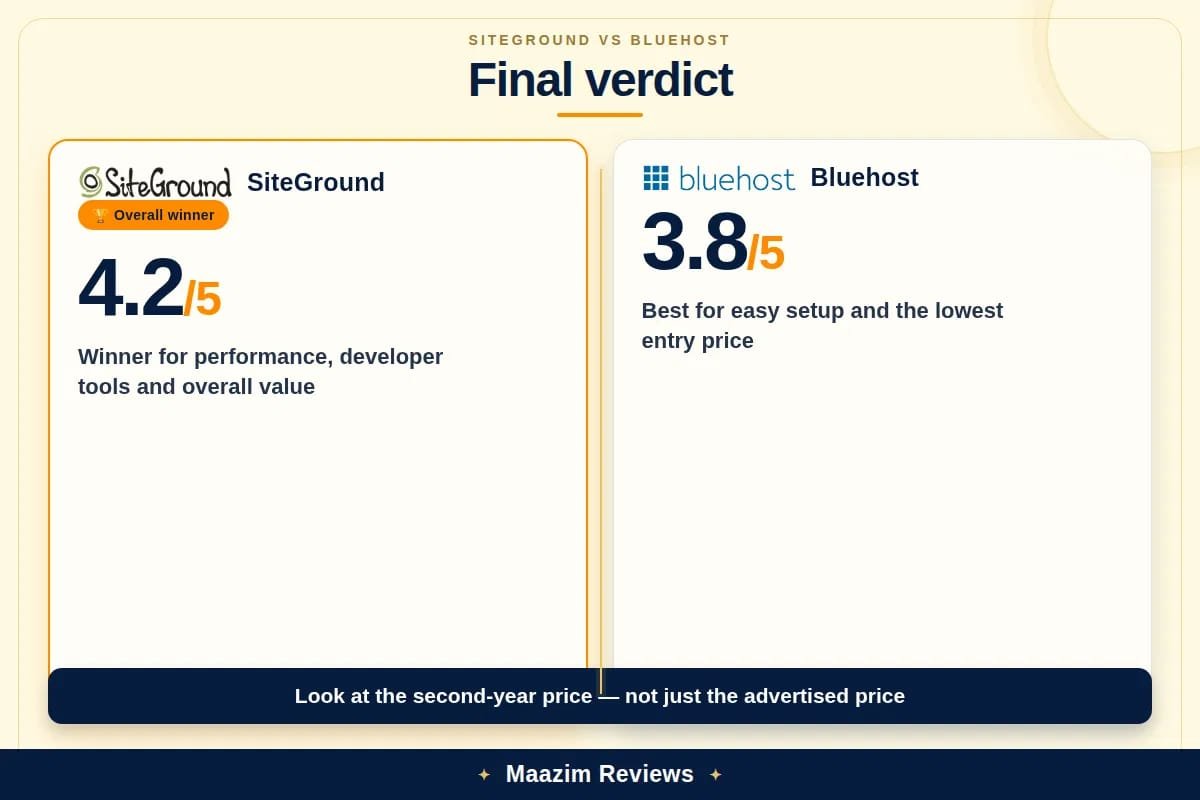
Both hosts are WordPress.org recommended and both include free SSL and CDN. The real differences are performance, support, included features, and price. SiteGround wins on the first three. Bluehost wins on price and ease of use for beginners. The question is which tradeoffs you can live with for three years.
Which one should you choose?
Choose SiteGround if:
- You care about server performance and want the fastest TTFB in shared hosting.
- You need staging environments for development or client work.
- You want daily backups included without paying extra.
- You are a developer, freelancer, or agency that needs SSH, Git, and WP-CLI access.
- Your audience is outside the US and you need a data center closer to them.
- You value support quality and want agents who can solve technical problems without escalation.
- You are willing to pay more for a genuinely better hosting infrastructure.
Choose Bluehost if:
- You are launching your first WordPress site and want the simplest possible onboarding.
- You want the lowest possible entry price and the longest introductory term (36 months).
- A free domain for the first year matters to your budget.
- You want 24/7 phone support and prefer cPanel familiarity.
- You are comfortable adding backup and security tools separately, or you plan to use Choice Plus and above.
- Your audience is primarily US-based and you do not need global data center selection.
- You want the WonderSuite AI wizard to build your initial site content.
Our recommendation: For most users who are serious about their website, SiteGround is the better long-term choice. The performance gap is real and measurable, the included features eliminate hidden costs, and the support quality means you will spend less time troubleshooting. The higher renewal price is the tradeoff, but you are paying for Google Cloud infrastructure, SuperCacher caching, and a support team that actually solves problems. If budget is your primary constraint and you are building a simple single site, Bluehost Basic with a 36-month lock-in is a reasonable choice. Just budget for CodeGuard backups and know that you may want to upgrade within 18 months as your site grows.
Ready to decide? Read our full SiteGround Review 2026 or our Bluehost Review 2026 for deeper testing data, screenshots, and individual verdicts.
Frequently asked questions
Is SiteGround better than Bluehost for WordPress?
Which is cheaper, SiteGround or Bluehost?
Are both SiteGround and Bluehost recommended by WordPress.org?
Does SiteGround or Bluehost include free backups?
Which host is faster, SiteGround or Bluehost?
Does SiteGround offer a free domain?
Can I switch from Bluehost to SiteGround later?
Does SiteGround or Bluehost offer staging environments?
Migration, growth, and total cost after year one
Both hosts offer migration paths, but the experience differs. SiteGround provides a free WordPress migrator plugin and offers one free professional site migration per account through their support team. The process is typically completed within 24-48 hours with no downtime. If you are moving from Bluehost to SiteGround, the migrator plugin handles the transfer cleanly.
Bluehost offers free website migration on Choice Plus and higher plans. On the Basic plan, migration is a DIY process through their WordPress migrator tool or a paid service. If you are moving from SiteGround to Bluehost, you will likely handle the migration yourself unless you are on a higher-tier plan.
Scalability: Both hosts scale beyond shared hosting, but the upgrade paths differ. SiteGround offers cloud hosting starting at approximately $100/month, built on the same Google Cloud infrastructure as their shared plans. The migration from shared to cloud is smoother because the underlying platform does not change. Bluehost offers VPS hosting (approximately $19.99-$120/month) and dedicated hosting (approximately $79.99-$209.99/month), with a wider price spread and more granular resource control. However, the jump from shared to VPS on Bluehost is a bigger technical leap than SiteGround’s shared-to-cloud transition.
Three-year total cost comparison (entry-level plans, including necessary add-ons):
- SiteGround StartUp: Year 1 at $3.99/mo = $47.88. Years 2-3 at $17.99/mo = $431.76. Three-year total: $479.64. All features included.
- Bluehost Basic (36-month lock-in): Years 1-3 at $3.99/mo = $143.64. Add CodeGuard ($107.64 over 3 years) and domain privacy ($44.97 over 3 years) = $296.25. But you also get a free domain for year 1 (saving ~$15), so net total: approximately $281.25.
- Bluehost Basic (12-month term): Year 1 at $3.99/mo = $47.88. Years 2-3 at $9.99/mo = $239.76. Add CodeGuard ($107.64) and domain privacy ($44.97) = $440.25. Minus free domain saving (~$15) = approximately $425.25.
With a 36-month lock-in, Bluehost is significantly cheaper over three years. With a 12-month term, the costs converge. The decision comes down to whether SiteGround’s performance, support, and included features are worth the premium. For most serious websites, the answer is yes.
Sources and research notes
Official pricing and feature pages reviewed: SiteGround web hosting plans, SiteGround hosting tutorial, Bluehost shared hosting, and Bluehost pricing. Internal review data sourced from our own SiteGround Review 2026 and Bluehost Review 2026, including TTFB benchmarks and feature verification. Competitor comparison pages reviewed include Pick Hosting, Fojilo, Mosco CRM, TheSmartWebTools, and Bluehost’s own comparison pages. Speed test data sourced from independent monitoring services and our own hands-on testing. Pricing data verified as a September 2026 snapshot. SiteGround introductory pricing shown as $3.99/mo for StartUp, though some competitor sources list $2.99/mo from earlier promotional periods. Always verify current pricing on the official site before checkout.