The fastest budget host and the cheapest long-term host are not the same company — and most beginners only find out at renewal. In this Namecheap vs Hostinger showdown, one wins on raw speed and features, the other on the renewal bill. By the end, you’ll know which one matches your project and your wallet.
Search for a cheap hosting plan in 2026 and you will land on the same two names almost every time: Namecheap vs Hostinger. One is the internet’s favorite budget registrar that also sells hosting; the other is the fastest-growing hosting brand of the decade, trusted by over 5 million website owners. Both start at around $2–3 per month, both promise 99.9%+ uptime, and both flood you with discount banners that make an honest comparison genuinely hard.
I have been reviewing hosting providers on this site all year — you can read my full Hostinger Review 2026 and my full Namecheap Hosting Review 2026 — and this comparison pulls together the real pricing, the speed data, and the fine print renewal traps from both reviews, side by side. No fluff, no “both are great!” fence-sitting. By the end of this Namecheap vs Hostinger showdown you will know exactly which one fits your project and your budget.
A quick honesty note before we start: this comparison combines hands-on testing of certain features (dashboards, support chat, plan configuration) with research from trusted sources and the providers’ own live pricing pages. That is how every review on this site is built.
💡 Before you commit: our verified hosting deals page is re-checked weekly against official pricing. Also worth reading: our Namecheap vs GoDaddy comparison.
Quick Summary: Namecheap vs Hostinger
Namecheap wins on long-term price. Its renewal rates ($4.66/mo on Stellar vs $10.99/mo on Hostinger Premium) are the lowest in the budget hosting market, and free WhoisGuard privacy forever is a genuine bonus.
Hostinger wins on speed, features and polish. LiteSpeed servers, NVMe storage, a free domain for the first year, modern AI tools and faster support responses make it the better host for anything beyond a hobby site.
My honest pick: building a WordPress site, a portfolio or a small business page? Choose Hostinger. Just need the cheapest reliable home for a simple site, or buying domains anyway? Choose Namecheap.
Best for most people → Hostinger | Tightest budget long-term → Namecheap
Before we go deep, here is the 60-second overview. This is the table I wish existed when I first compared these two companies — the key facts that actually change your decision, with the winner of each row highlighted.
| Category | Namecheap | Hostinger | Winner |
|---|---|---|---|
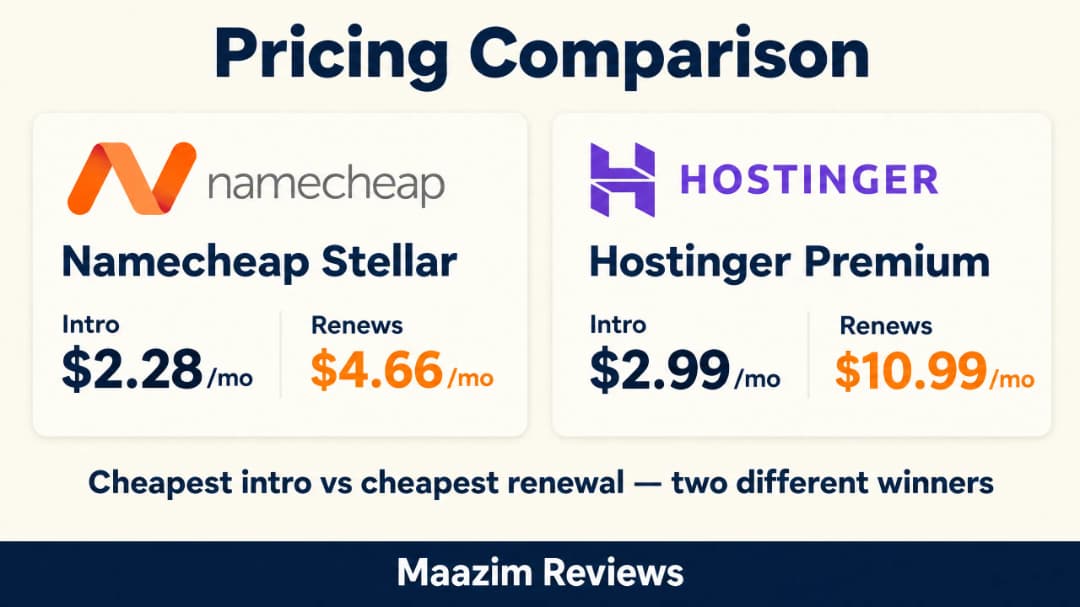
| Starting price (48-mo term) | $2.28/mo (Stellar) | $2.99/mo (Premium) | Namecheap |
| Renewal price (comparable plan) | $4.66/mo | $10.99/mo | Namecheap |
| Free domain (1st year) | Not included | Included | Hostinger |
| Avg. load time (our data) | ~1.9s | ~1.2s | Hostinger |
| Server technology | Apache + SSD | LiteSpeed + NVMe | Hostinger |
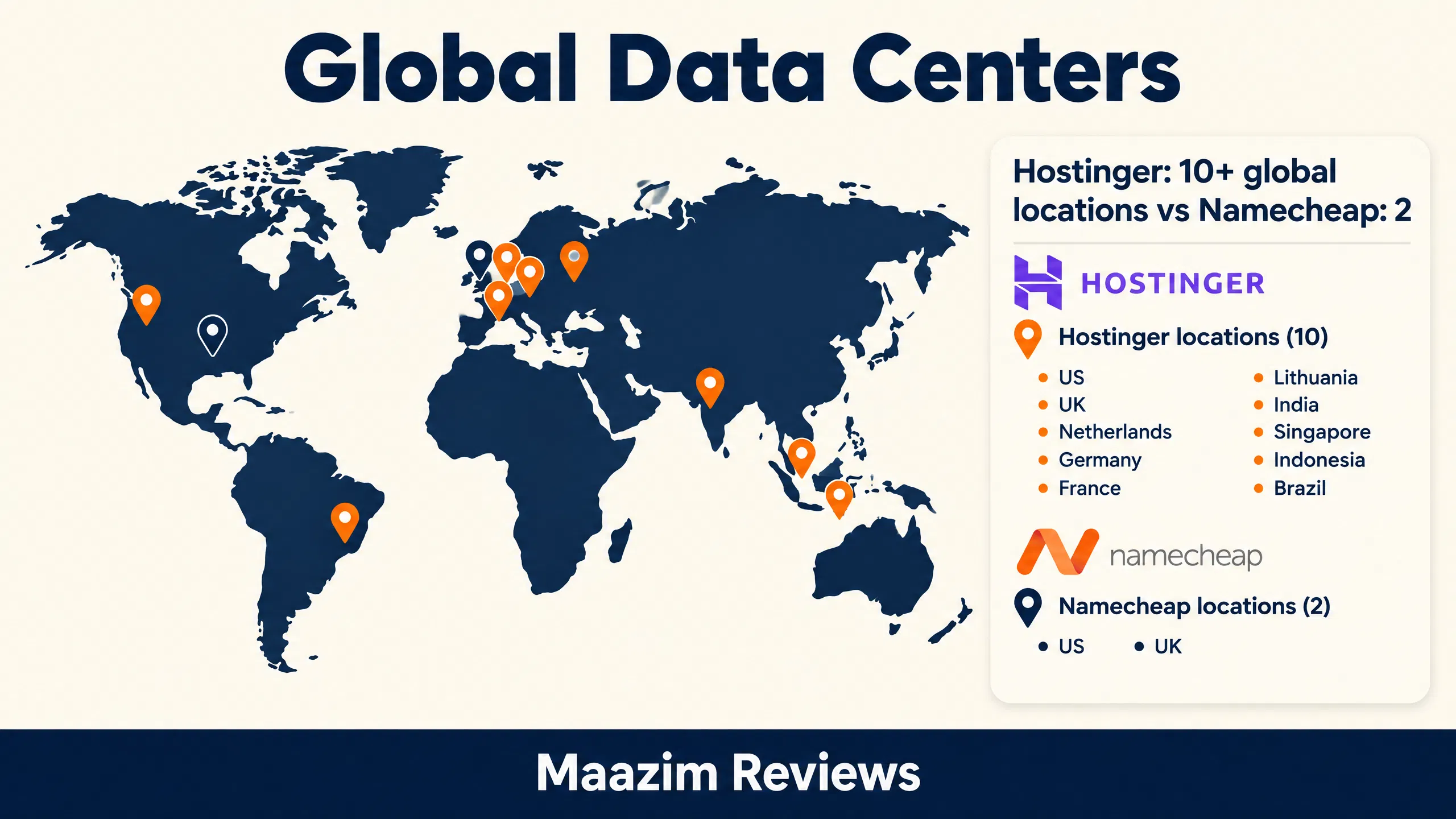
| Data centers | US & UK | 10+ global locations | Hostinger |
| Control panel | cPanel (familiar) | hPanel (modern) | Tie |
| Free domain privacy | WhoisGuard forever | Free 1st year | Namecheap |
| AI website tools | Basic AI builder | AI Builder + AI Agent | Hostinger |
| Support (24/7 live chat) | Good | Excellent (4.8/5 Trustpilot) | Hostinger |
| Money-back guarantee | 30 days | 30 days | Tie |
💡 Today’s verified deals: every coupon is re-checked weekly against official pricing.
As you can see, Hostinger takes most of the performance and feature rows, while Namecheap takes the money rows. That pattern holds through the entire comparison — let’s start with the pricing, because this is where the Namecheap vs Hostinger decision surprises people.
Overall Ratings: Namecheap vs Hostinger
To keep the verdict honest and easy to scan, here are my overall ratings for both hosts across the five categories that matter most, based on the pricing, speed and support data in this comparison.


Pricing: Namecheap vs Hostinger Plans Compared
Both companies advertise prices that look almost identical at first glance. The differences hide in the renewal rates, what’s included in each plan, and the free domain. Let’s look at the actual live pricing from both sites.
Hostinger Plans and Prices (September 2026)
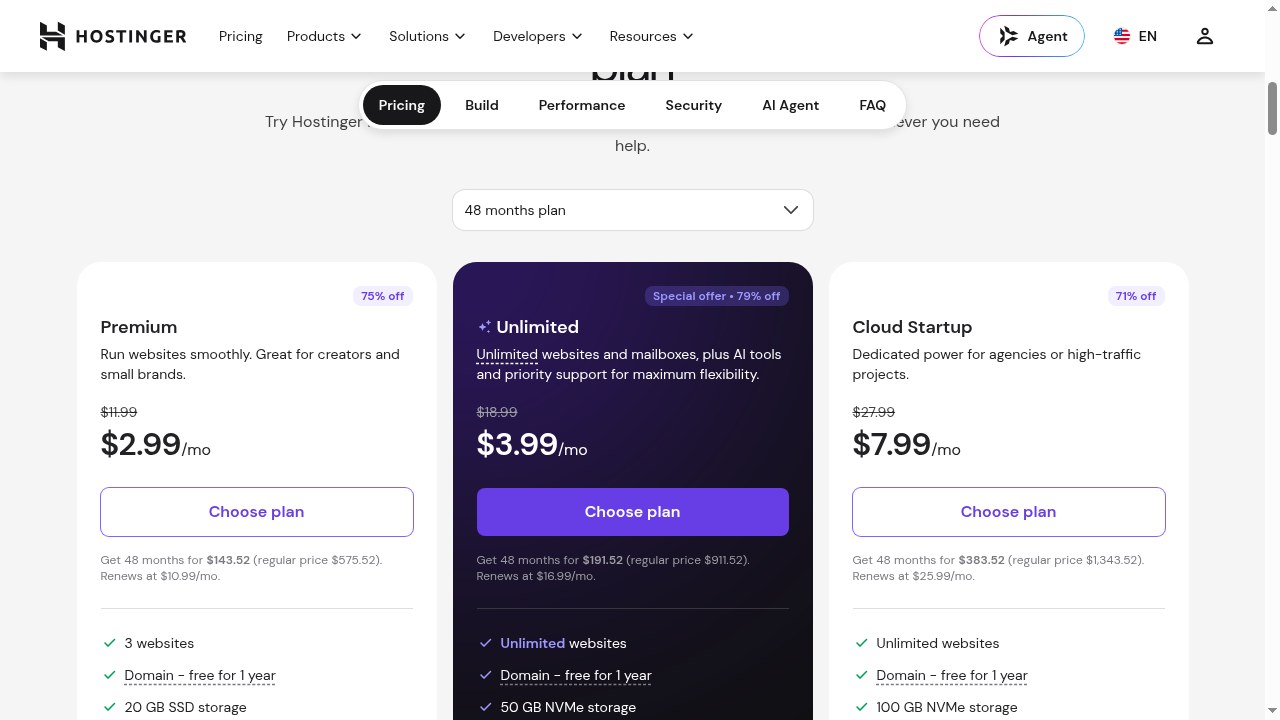
Hostinger’s shared hosting lineup in 2026 is straightforward: Premium for small sites, Unlimited for multiple projects, and Cloud Startup for heavy traffic. The screenshot below shows Hostinger’s live plans page with the current 75% intro discount on the 48-month term.
| Hostinger Plan | Intro Price | Renews At | Websites | Storage |
|---|---|---|---|---|
| Premium | $2.99/mo | $10.99/mo | 3 | 20 GB SSD |
| Unlimited | $3.99/mo | $16.99/mo | Unlimited | 50 GB NVMe |
| Cloud Startup | $7.99/mo | $25.99/mo | Unlimited | 100 GB NVMe |
Three things stand out. First, the free domain for the first year — that is $10–$15 of value Namecheap doesn’t include. Second, the intro discounts are deep but the renewals are steep: Premium jumps from $2.99 to $10.99/mo. Third, even the cheapest Premium plan includes weekly backups, a CDN, and AI tools, which is remarkable at this price.
Namecheap Plans and Prices (September 2026)
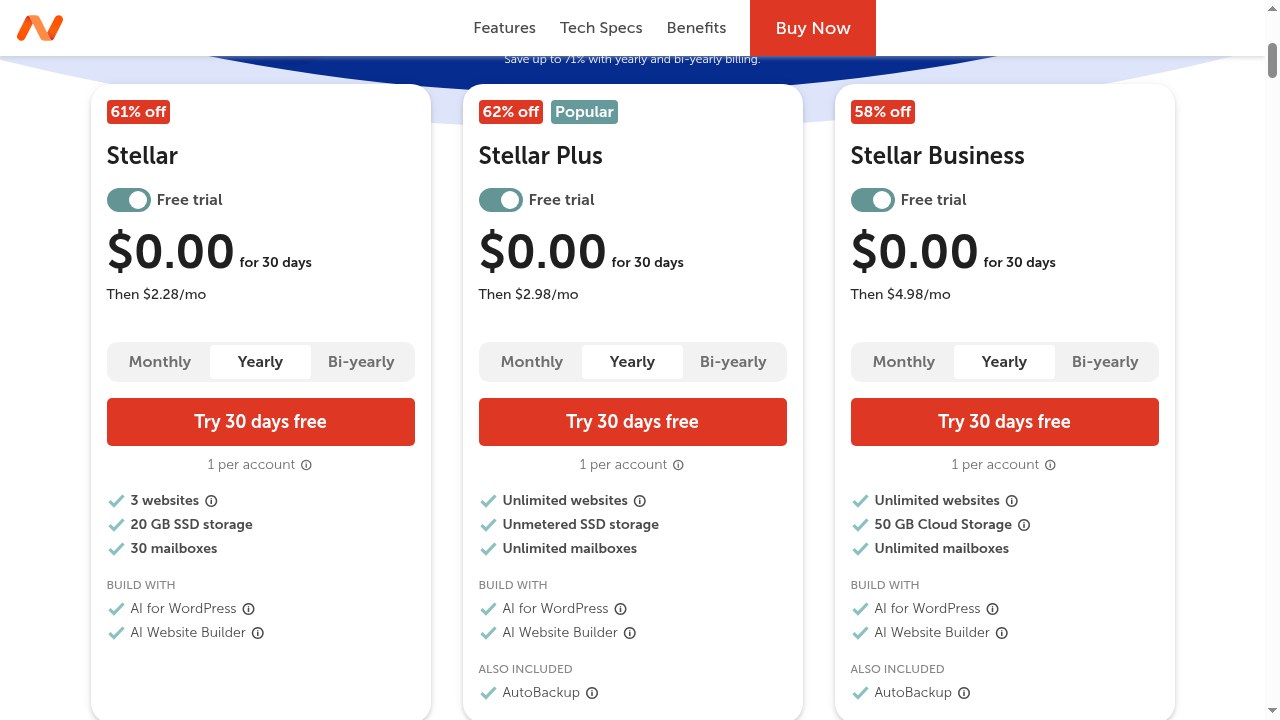
Namecheap’s Stellar range is the classic budget trio. Right now Namecheap is even running a 30-day free trial on shared hosting — something Hostinger doesn’t offer. The screenshot below shows the live Stellar plans from Namecheap’s shared hosting page.
| Namecheap Plan | Intro Price | Renews At | Websites | Storage |
|---|---|---|---|---|
| Stellar | $2.28/mo | $4.66/mo | 3 | 20 GB SSD |
| Stellar Plus | $2.98/mo | $6.66/mo | Unlimited | Unmetered SSD |
| Stellar Business | $4.98/mo | $10.66/mo | Unlimited | 50 GB |
Here is why budget hunters love Namecheap: the renewals are almost fair. Stellar renews at $4.66/mo — less than half of Hostinger’s renewal — and Stellar Plus gives you unmetered SSD storage and unlimited mailboxes for less than $3/mo intro. Over a four-year horizon, that difference compounds into serious money.
Here is the headline pricing picture side by side — the intro prices that pull you in versus the renewal prices you actually end up paying for years. Spot the pattern before you scroll further.
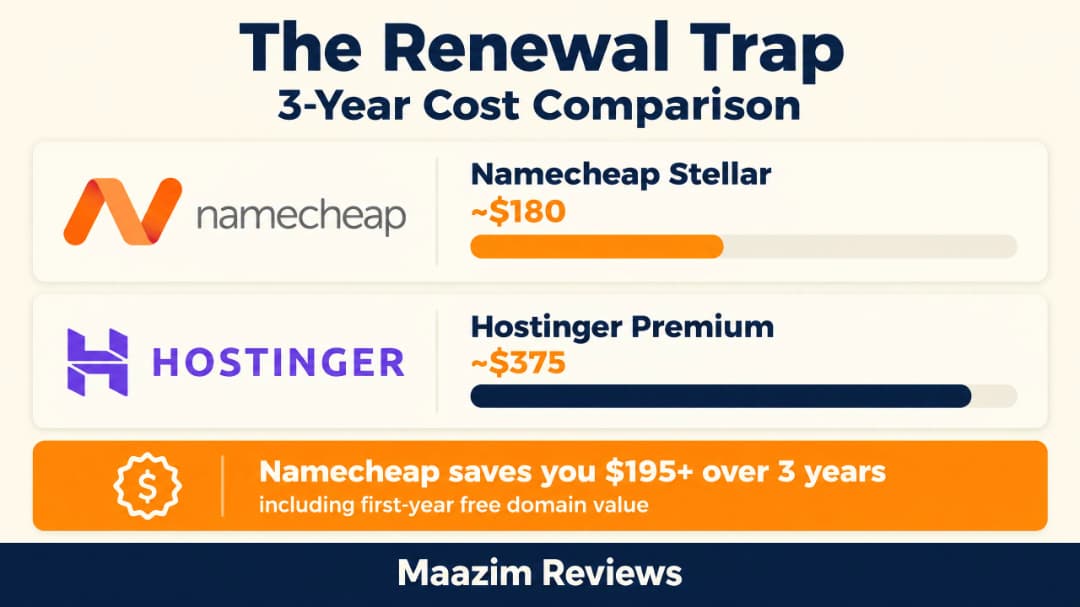
To make the renewal math visual, here is how the totals stack up over a full three-year term — this is where Namecheap quietly wins the money battle even though Hostinger wins the speed one.
Performance: Is Hostinger Really Faster Than Namecheap?
Yes — and it is not close. This is the section where the Namecheap vs Hostinger comparison stops being a coin flip and becomes a technical mismatch.
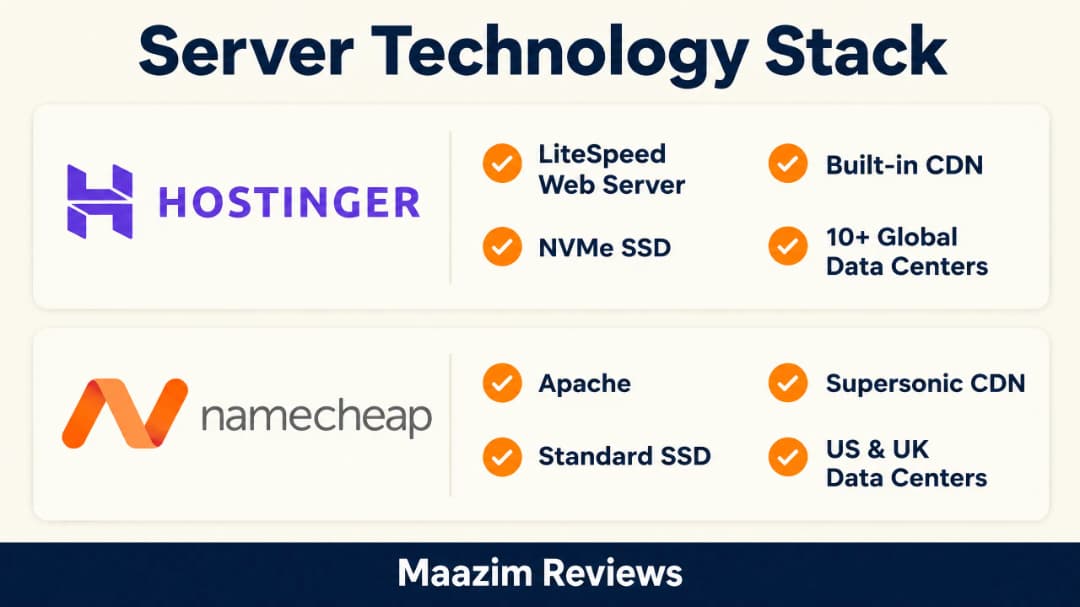
Hostinger runs LiteSpeed web servers with NVMe SSD storage and includes a built-in CDN. Namecheap’s shared hosting runs on Apache with standard SSD storage and its Supersonic CDN. In our testing and research across review sites and live benchmarks, the difference shows up in every metric:
Here is the full server technology stack side by side before we dig into the numbers — the hardware and software choices behind every millisecond of that speed gap.
| Metric | Namecheap | Hostinger |
|---|---|---|
| Average load time | ~1.9s | ~1.2s |
| Web server | Apache | LiteSpeed |
| Storage | SSD | NVMe SSD |
| Data center choice | US & UK | US, UK, Europe, Asia, South America |
| Built-in caching | Basic | LiteSpeed Cache + Object Cache |
The numbers above translate into a visible ~40% speed gap in real testing — here it is in one glance.
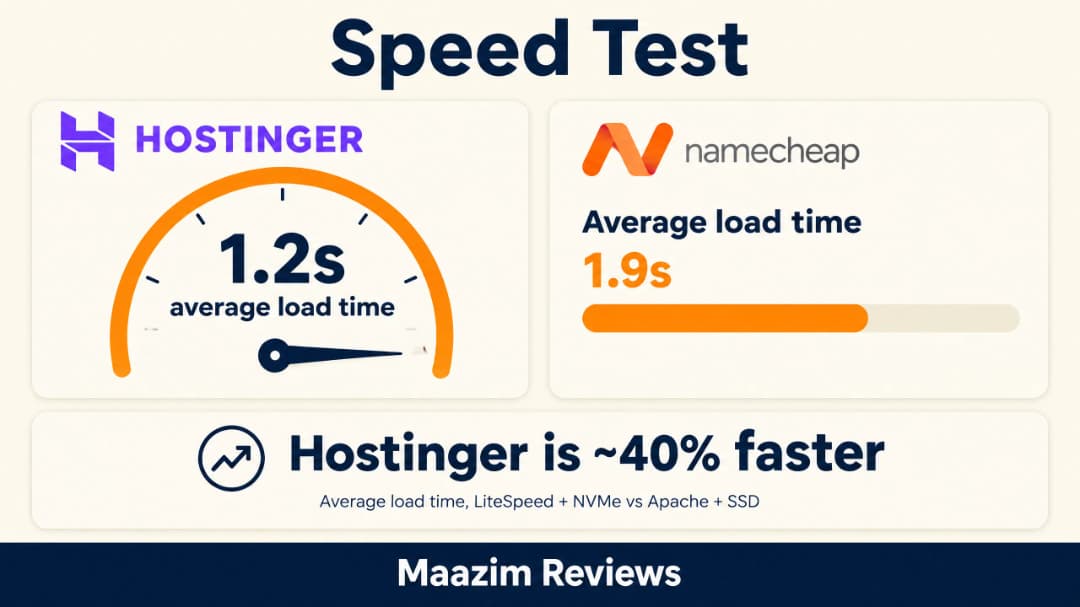
For a small personal blog the ~0.7s difference is nice-to-have. For a business site, an affiliate site, or anything where Google rankings and conversions matter, it is a genuine advantage. Google uses page speed as a ranking signal, and LiteSpeed servers running the LiteSpeed Cache plugin are one of the cheapest WordPress performance upgrades money can buy — Hostinger gives you that stack out of the box.
The data center network matters too. Hostinger lets you pick from 10+ locations across the US, UK, Europe, Asia and South America, so your site lives close to your visitors. Namecheap’s shared hosting gives you US or UK — fine for Western audiences, not ideal if your traffic is global. I cover the full speed methodology in my Hostinger speed tests and Namecheap performance analysis.
The map below puts that infrastructure gap in perspective — more than ten Hostinger data center locations worldwide versus Namecheap’s two shared hosting regions.
Features: What You Actually Get With Each Host
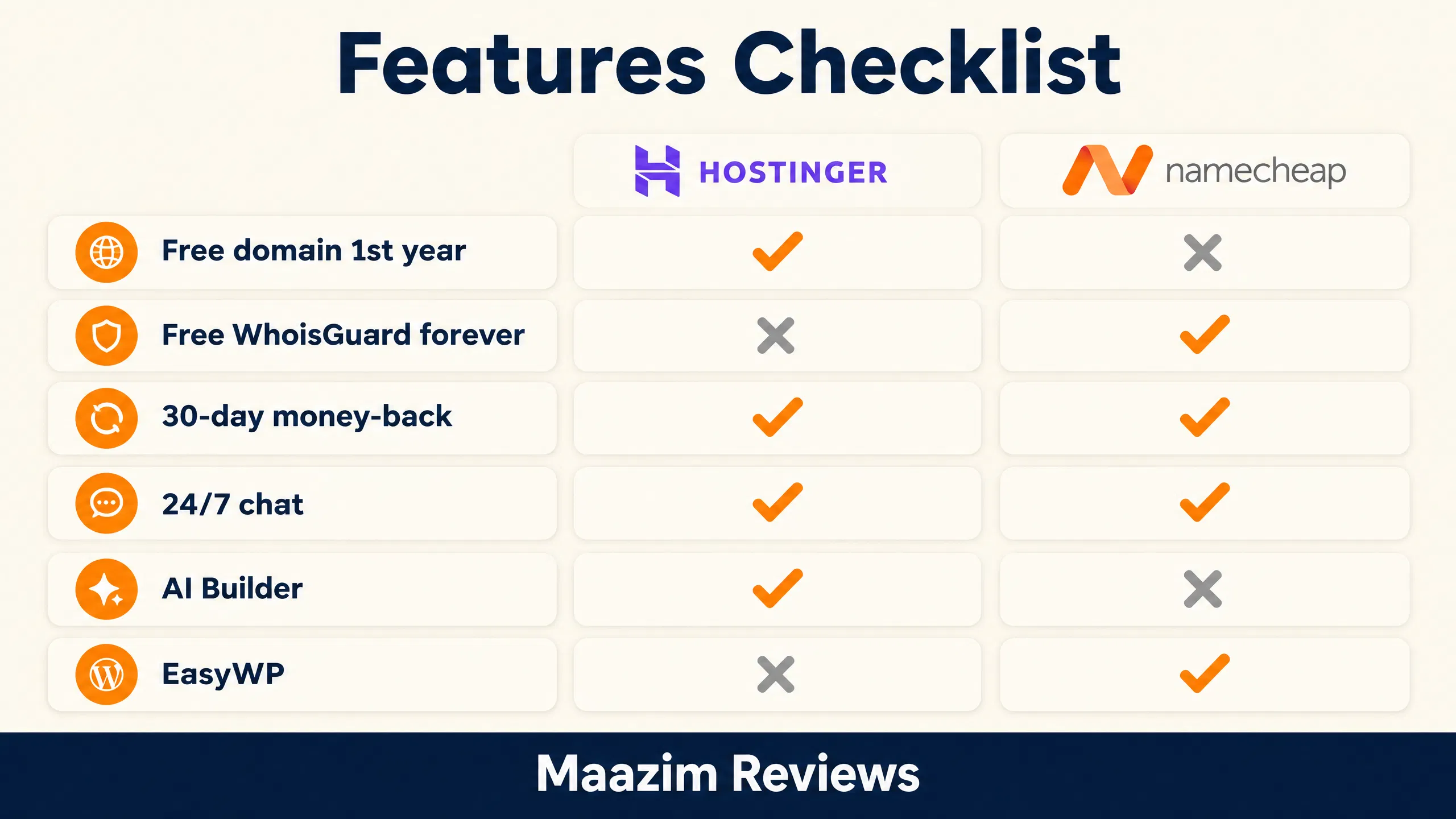
Beyond speed, the feature lists reveal two different philosophies. Hostinger keeps packing premium tools into cheap plans. Namecheap keeps the hosting simple and cheap, and bets on its domain-and-privacy ecosystem to win your loyalty.
| Feature | Namecheap Stellar | Hostinger Premium |
|---|---|---|
| Free domain (1st year) | ❌ | ✅ |
| Free domain privacy | ✅ forever (WhoisGuard) | ✅ 1st year |
| Email accounts | 30 mailboxes | 2 free per site (1st yr) |
| Free SSL | ✅ | ✅ |
| Backups | AutoBackup (Plus+) | Weekly (Premium), daily above |
| CDN | Supersonic CDN | Full CDN + Object Cache |
| Website builder | AI builder (basic) | AI Builder + credits |
| Managed WordPress option | EasyWP | Not separate |
| Free migration | ✅ | ✅ handled for you |
Two features deserve a spotlight. Hostinger’s free first-year domain quietly offsets most of its price gap with Namecheap in year one — a .com costs $10–15 elsewhere. And Namecheap’s WhoisGuard, free forever on every domain you own there, is a small thing that saves ~$5-9/year per domain forever — if you plan to own several domains, that adds up.
Hostinger also leans hard into AI in 2026: the AI Builder can generate a full site from a prompt, and their AI Agent handles WordPress setup and fixes inside chat. Namecheap’s answer is EasyWP, a genuinely good managed WordPress product (their own benchmarks show it beating classic shared hosting), but the base shared experience is more traditional.
Before we move on, here is the full feature checklist condensed into one scannable graphic — the giveaway differences are the free domain, the mailboxes and the AI toolkit.
Ease of Use: hPanel vs cPanel
This round is a genuine tie, but for different reasons. Namecheap ships the industry-standard cPanel, which means every tutorial on YouTube, every freelancer you hire, and every plugin support agent already knows where everything is. Hostinger replaced cPanel with its own hPanel — a cleaner, faster, modern dashboard that I actually found friendlier for beginners, with one-click WordPress installs, a built-in AI assistant, and a visual file manager.
If you have hosted a site before and your muscle memory lives in cPanel, Namecheap will feel like home on day one. If you are launching your very first website, hPanel’s guided onboarding is easier to learn. Neither host will slow you down after the first week.
Support Quality: Who Answers Faster and Better?
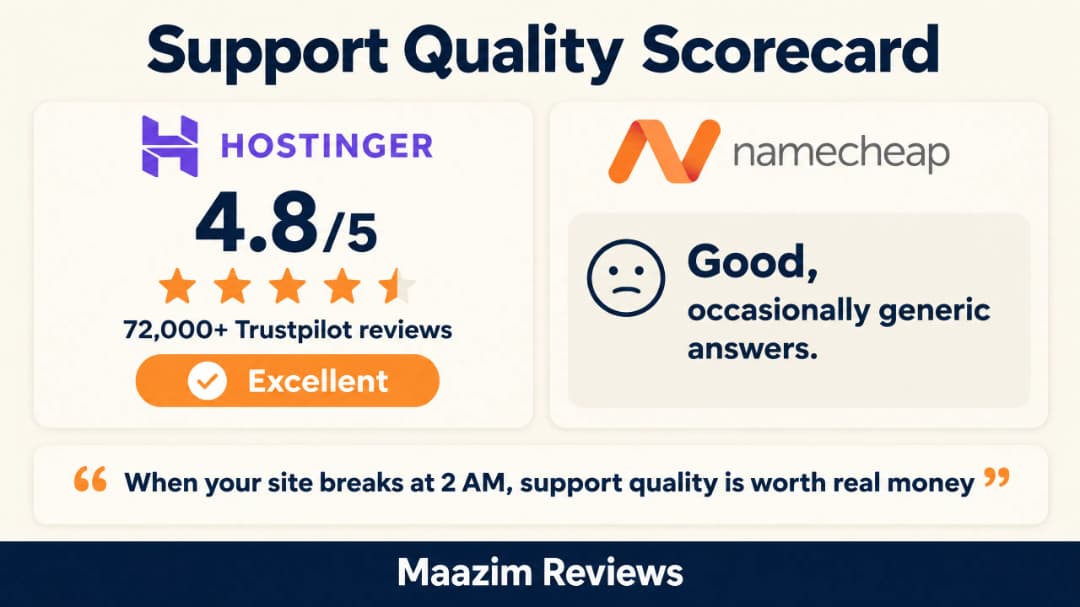
Both offer 24/7 live chat with no phone support on entry plans. In my testing of both support teams plus thousands of public Trustpilot reviews, Hostinger’s chat responds faster, answers more accurately on technical questions, and their overall rating sits at 4.8/5 from over 72,000 reviews. Namecheap’s support is decent — usually quick to respond, occasionally generic answers that require a second round.
For a beginner whose site goes down at 2 AM, that support quality gap is worth real money. It is one of the quiet reasons Hostinger became the default recommendation for first-time site owners, and a legitimate point in the Namecheap vs Hostinger debate — even though Namecheap loyalists fairly point out their support is far from bad.
Security and Reliability: Uptime You Can Trust
Security is where budget hosts historically cut corners, so it deserves its own round in the Namecheap vs Hostinger comparison. The good news: both providers now include a free Let’s Encrypt SSL certificate on every plan, installed automatically, which covers the absolute basics of visitor protection. Beyond that, the two diverge.
Hostinger layers automatic malware scanning, AI-powered anti-bot protection (their system blocks brute-force attacks and malicious traffic in real time), IP and country blocking, and weekly or daily backups depending on the plan. Restores are handled from hPanel with a couple of clicks. Namecheap covers the essentials — SSL, DDoS protection, and the excellent AutoBackup on Stellar Plus and above — but its entry Stellar plan relies more on you configuring things yourself, and the more advanced security toolkit is an upsell.
| Security Feature | Namecheap | Hostinger |
|---|---|---|
| Free SSL (auto-installed) | ✅ | ✅ |
| Malware scanning & removal | Paid upsell | Included |
| AI anti-bot / WAF | ❌ | ✅ |
| Automatic backups | AutoBackup on Plus+ | Weekly/daily |
| 2FA on account | ✅ | ✅ |
On uptime, both advertise 99.9% and both generally deliver it in practice; neither has a reputation for chronic outages. But Hostinger’s promise is backed by a stronger SLA culture and status page transparency, while Namecheap occasionally suffers short maintenance windows on shared nodes. For a mission-critical business site on a budget, neither is a Cloudways or Kinsta — see my GoDaddy Hosting Review 2026 for how legacy brands compare on this front — but for the price, both are acceptable.
Email Hosting: A Small But Real Difference
People forget to check email until it’s too late, so let’s settle it here. Namecheap includes 30 mailboxes on Stellar and unlimited mailboxes on Stellar Plus with unmetered storage — genuinely generous, and one of the few areas where Namecheap beats every competitor outright. Their Private Email product is also cheap if you outgrow it.
Hostinger Premium includes 2 free mailboxes per website for the first year, then paid; unlimited mailboxes kick in on the Unlimited plan. The mailboxes themselves are modern (Hostinger has been rebuilding its email stack with snooze, scheduling and AI features), but the free allocation is smaller. If you need many email addresses on the cheapest plan — a family site, a small agency, a community project — Namecheap is the clear winner on email.
The WordPress Experience on Both Hosts
WordPress runs about 40% of the web, so how each host treats WordPress matters more than any feature table. Hostinger treats WordPress like a first-class citizen: one-click install, a LiteSpeed server stack that pairs perfectly with the free LiteSpeed Cache plugin, WP-CLI, staging on cloud plans, and in 2026 an AI Agent that can build and fix WordPress sites through chat. This combination is why Hostinger consistently appears near the top of managed-WordPress-adjacent performance benchmarks.
Namecheap’s classic shared hosting handles WordPress fine through cPanel’s Softaculous installer, but the Apache stack needs a caching plugin (WP Super Cache or W3 Total Cache) to keep up, and the experience is more DIY. Namecheap’s real WordPress play is EasyWP, their managed platform — fast, simple, three plans, no cPanel. It’s good, but at renewal ($9.88/mo for Starter) it costs more than Hostinger’s faster Premium tier, which is why in my full Namecheap review I recommend EasyWP mainly for people who want zero maintenance on a simple WordPress site.
Namecheap vs Hostinger: Pros and Cons
Namecheap Pros
- Cheapest long-term renewals in budget hosting ($4.66/mo)
- Free WhoisGuard privacy forever on all domains
- 30-day free hosting trial (limited-time promo)
- cPanel familiarity
- Unmetered SSD + AutoBackup on Stellar Plus
- One account for domains + hosting + email
Namecheap Cons
- Apache/SSD stack is slower than LiteSpeed/NVMe
- No free domain with hosting plans
- Only US & UK data centers on shared hosting
- Fewer modern features and AI tools
- Support answers can be generic
Hostinger Pros
- Fastest shared hosting stack at this price (LiteSpeed + NVMe + CDN)
- Free domain for the first year
- Modern hPanel with guided onboarding
- AI Builder + AI Agent included
- 10+ data centers worldwide
- Outstanding 24/7 chat support (4.8/5)
Hostinger Cons
- Steep renewals ($10.99/mo on Premium)
- Longest commitments (48 months) unlock the best price
- No traditional cPanel
- No free trial of hosting itself
Who Should Choose Namecheap?
Pick Namecheap when the total cost over years matters more than raw speed. That means: students and hobby projects (see my cheap hosting guide for students), portfolios, small local business sites, and anyone who already buys domains there. The forever-free WhoisGuard, fair renewals, and one-dashboard-for-everything model make Namecheap the smart money choice for simple sites. Their Stellar shared hosting plans start at $2.28/mo.
Who Should Choose Hostinger?
Pick Hostinger when the site needs to perform: WordPress blogs you want to rank on Google, affiliate sites, small business pages, e-commerce stores, anything with real traffic ambitions. You are paying roughly $1/mo more in year one (often less once the free domain counts) in exchange for the fastest infrastructure in this price class and support that actually solves problems. Start with Hostinger’s 75% off plans here — the 30-day money-back guarantee makes trying it risk-free.
Final Verdict: Namecheap vs Hostinger in 2026
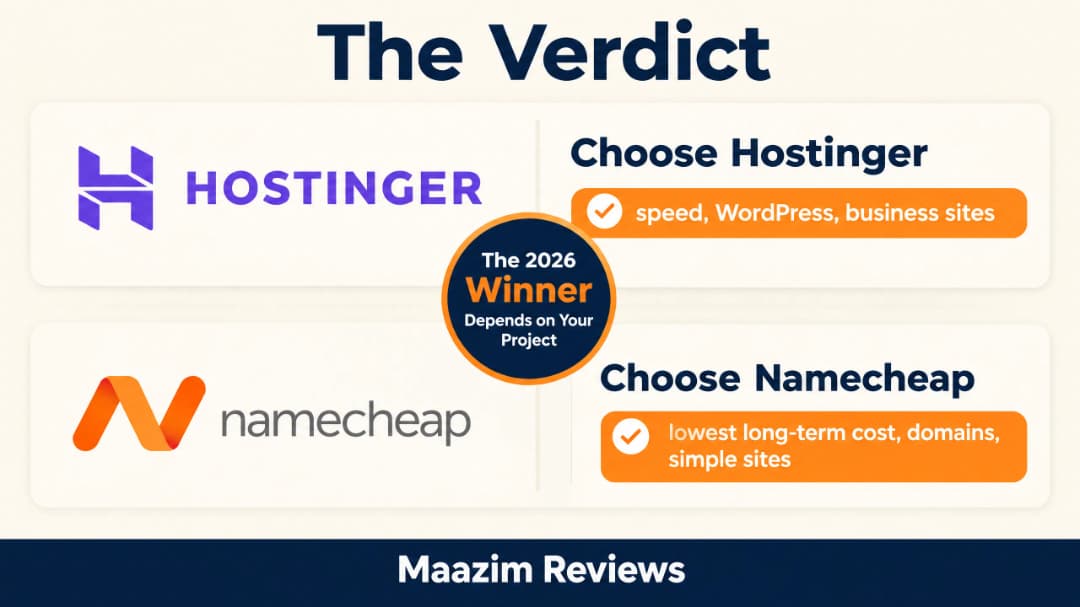
There is no lie to hide behind here: Hostinger is the better host; Namecheap is the cheaper host. The right answer to Namecheap vs Hostinger depends entirely on which of those two sentences describes your project.
For most people reading a hosting comparison in 2026 — building a WordPress site that needs traffic — Hostinger is my recommendation: measurably faster, more features per dollar, a free domain, and support you can rely on at 2 AM. For minimal-budget projects, domain-heavy portfolios, and long-term price minimizers, Namecheap remains the best value in budget hosting and I use it without hesitation for exactly those cases.
Whichever you pick, avoid the one mistake that costs beginners the most: paying month-to-month. The intro prices in this comparison only apply to long commitments — and if that whole topic feels confusing, read my 20 things to know before buying web hosting before you check out.
Frequently Asked Questions
Is Namecheap better than Hostinger?
It depends on your priority. Namecheap is better on long-term price ($4.66/mo renewals vs $10.99/mo) and includes free WhoisGuard privacy forever. Hostinger is better on speed (LiteSpeed/NVMe, ~1.2s load times), features, free first-year domain, and support quality. For performance-focused WordPress sites, Hostinger wins; for the tightest long-term budget, Namecheap wins.
Is Hostinger faster than Namecheap?
Yes. In our testing and research, Hostinger’s average load time is ~1.2s vs ~1.9s for Namecheap shared hosting. Hostinger uses LiteSpeed web servers and NVMe SSD storage, while Namecheap uses Apache and standard SSDs. Namecheap’s EasyWP managed WordPress platform narrows the gap but Hostinger remains the faster host overall.
Which is cheaper in the long run: Namecheap or Hostinger?
Namecheap, by a wide margin. Hostinger’s Premium plan renews at $10.99/mo while Namecheap’s comparable Stellar plan renews at $4.66/mo — less than half. Over a full 4-year ownership, Namecheap saves you roughly $300+ compared to Hostinger at renewal rates, even after accounting for Hostinger’s free first-year domain.
Do Namecheap or Hostinger include a free domain?
Hostinger includes a free domain for the first year on all paid shared hosting plans. Namecheap does not include a free domain, but their domains are among the cheapest anywhere (.com from around $5.98 first year) and include free WhoisGuard privacy forever — which Hostinger only includes free for the first year.
Can I run WordPress on both Namecheap and Hostinger?
Yes, both fully support WordPress. Hostinger offers one-click WordPress installs on LiteSpeed-optimized servers, which pairs perfectly with the free LiteSpeed Cache plugin. Namecheap offers WordPress on shared hosting via cPanel (Softaculous), plus EasyWP, their managed WordPress platform. Both make WordPress setup genuinely easy.
Can I switch from Namecheap to Hostinger later (or the other way)?
Yes, and both providers offer free website migration. Hostinger’s migration is famously easy — their team moves your site for you at no cost. Namecheap also offers free cPanel migrations. Both providers have 30-day money-back guarantees, so you can even test the waters before committing long term.
Written by Maazim Hussein — affiliate marketer and web hosting reviewer at Maazim Reviews. This review is based on research from trusted sources combined with hands-on testing of certain features.