
“In a sea of project management tools, most feel like digital filing cabinets. monday.com, however, feels like a custom-built cockpit for your business.”
When it comes to managing projects, streamlining workflows, and keeping teams aligned, monday.com continues to stand out as one of the most powerful SaaS platforms in 2025. It’s no longer just about checking off boxes; it’s about having a command center that adapts to your unique business needs. Whether you’re running a fast-growing startup, managing an enterprise team, or simply organizing your personal workflow, monday.com offers exceptional flexibility, automation, and ease of use that few competitors can match.
In this comprehensive review, we break down its features, performance, pricing, and real-world pros and cons—helping you decide if it’s the right engine to drive your business forward.
What Is monday.com?
monday is a cloud-based Work OS (Work Operating System) that allows individuals and teams to build customizable workflows for project management, CRM, content planning, HR operations, software development, and more.
It’s designed for simplicity and scalability — meaning you can start with basic task tracking and gradually evolve into full enterprise automation without switching platforms.
Core Features: Why monday.com Leads the Market in 2026
1. AI-Powered “Sidekick” & Automation
Beyond simple “no-code” recipes, monday.com now features Sidekick AI, a proactive assistant that goes beyond basic task automation.
- Predictive Workflows: Sidekick identifies potential bottlenecks in your timeline before they happen.
- Natural Language Setup: Simply type “Build a marketing launch board with automation for approvals,” and the AI constructs the entire structure in seconds.
- Smart Summaries: Instantly condense long comment threads or complex board data into actionable executive summaries.
2. Dynamic Data Visualization (The Cockpit View)
The “Digital Filing Cabinet” era is over. monday’s dashboards are now hyper-dynamic, pulling real-time data from across 50+ boards (on Enterprise plans).
- Advanced Views: Move beyond basic tables to Gantt, Kanban, Workload, and 3D Chart views.
- Resource Management: The Workload Widget helps managers rebalance team capacity in real-time to prevent burnout.
- mondayDB 2.0: High-speed data engine ensures that even boards with 100k+ items load instantly.
3. Specialized “monday CRM” Ecosystem
monday.com has evolved into a standalone Sales CRM that rivals traditional players like HubSpot.
- Email Sync & Tracking: Fully integrated 2-way sync with Gmail and Outlook.
- Mass Outreach: Automate personalized email sequences and track open rates directly from your board.
- Revenue Forecasting: AI-driven insights that predict deal closure probability based on historical data.
4. Seamless “Connected Workspace” Integrations
With 200+ native integrations, monday.com acts as the “glue” for your tech stack. It eliminates context-switching by connecting to:
- Communication: Slack, Microsoft Teams, Zoom.
- Development: GitHub, Jira, GitLab.
- Marketing & Sales: Salesforce, HubSpot, Facebook Ads, Shopify.
- Storage: Google Drive, Dropbox, Box.
5. Centralized Team Collaboration (WorkDocs)
The introduction of monday WorkDocs has turned the platform into a collaborative canvas.
- Live Elements: Embed real-time monday boards and widgets directly into your documents.
- Actionable Text: Highlight any sentence in a WorkDoc and instantly turn it into a task on a board.
- Co-editing: Real-time brainstorming with mentions, emojis, and shared file versioning.
6. Enterprise-Grade Security & Governance
For large organizations, security is non-negotiable. monday.com provides a fortress-like environment:
Panic Mode: Admin-level ability to instantly lock down the account in case of a security breach.
Granular Board Roles: Define exactly who can edit, view, or contribute at a sub-item level.
Compliance: SOC 2 Type II, HIPAA, GDPR, and ISO 27001/27018.
Audit Logs: Track every change made across the account for total transparency.
monday.com Pricing (2025)
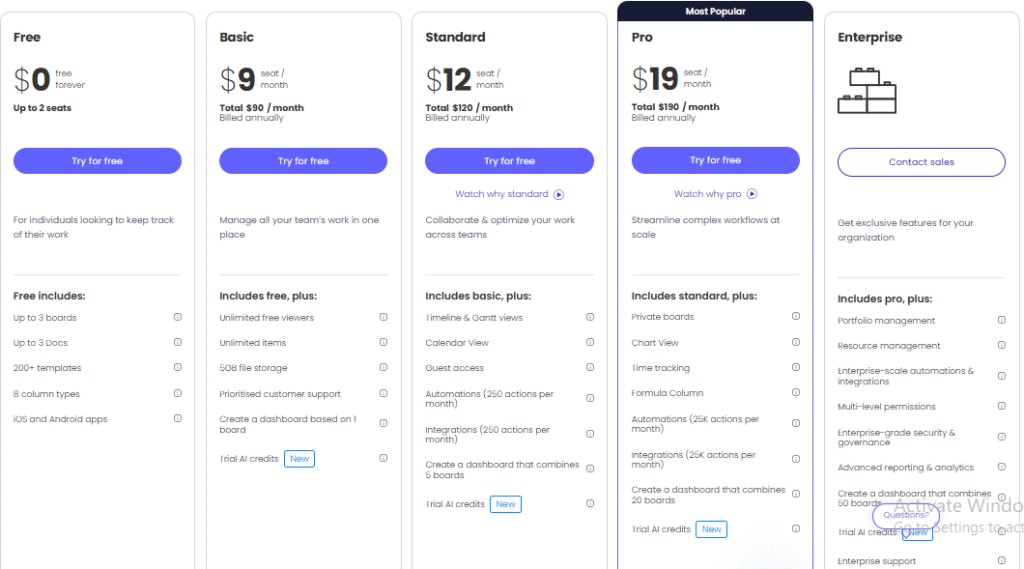
Note: Prices reflect the recent 2026 adjustments for AI-enhanced features.
| Plan | Best For | Price (Per User/Mo) |
| Free | Individuals & Freelancers | $0 (Up to 2 Seats) |
| Basic | Small teams needing a digital hub | ~$10 |
| Standard | Most Popular: Best for Automation/Gantt | ~$14 |
| Pro | Complex workflows & heavy AI usage | ~$22 |
| Enterprise | Large Orgs with high-level security | Custom Quote |
Pros & Cons: A Transparent Look
To provide true E-E-A-T value, we must look at the trade-offs:
✅ The Pros
- Unmatched Visuals: The most intuitive interface in the SaaS market.
- AI-Driven Efficiency: Sidekick AI genuinely saves hours of manual entry.
- Scalability: Transitions seamlessly from a 5-person team to a 5,000-person enterprise.
❌ The Cons
- Pricing Tiers: Access to the best AI features requires a Pro or Enterprise subscription.
- Mobile Complexity: While improved, managing complex automations is still best done on a desktop.
Final Verdict: Is It Worth It?
If your business relies on high-speed collaboration and data-driven decisions, monday.com is the best investment you can make in 2026. It moves beyond “task management” and offers a scalable environment that grows with your complexity.

Pingback: The Ultimate Guide to AI SaaS Product Classification Criteria (2026 Edition) - maazim Reviews
Pingback: FreshBooks Review: The Freelancer’s Savior or Just Another Accounting Tool? - maazim Reviews
Pingback: The Ultimate FreshBooks Review 2026: The Freelancer’s Savior or Just Another Tool? 2026 - Maazim Reviews
Pingback: SaaS License Management (2026): A Simple Guide for Beginners - Maazim Reviews