
Affiliate Disclosure: We believe in transparency. This article contains affiliate links. If you click on a link and make a purchase, we may earn a commission at no additional cost to you. This helps support our research and allows us to continue providing high-quality, unbiased reviews.
Is it possible to actually enjoy doing your taxes? In this comprehensive FreshBooks review, we discover that the answer is a resounding yes. Imagine this scenario: It is Friday afternoon. You have just finished a week of grueling work for a client. You are ready to close your laptop and start your weekend, but a nagging thought stops you cold—you haven’t sent the invoice. You open a messy Excel spreadsheet, try to remember how many hours you worked, struggle to format a PDF, and pray you didn’t mess up the formulas.
If this sounds familiar, you are suffering from “Administrative Paralysis,” a common affliction among freelancers and small business owners. Enter FreshBooks—a SaaS solution designed to cure this headache by moving you away from spreadsheets and into the cloud…
FreshBooks began in 2003, allegedly coded in a parent’s basement, born out of frustration with Word and Excel invoicing. Today, it is a cloud-based accounting SaaS (Software as a Service) designed specifically for freelancers, solopreneurs, and small service-based businesses.
Unlike competitors that were built for accountants first and business owners second, FreshBooks was built for the non-accountant. Its primary philosophy is “ridiculously easy to use.” However, in recent years, it has evolved from a simple invoicing tool into a robust double-entry accounting platform.
To evaluate the software properly, we must look beyond the marketing and test the functionality.
Invoicing is FreshBooks’ bread and butter, and it shows. The interface for creating an invoice is “What You See Is What You Get” (WYSIWYG). You don’t fill out a form and hope the PDF looks good; you edit the invoice directly on the screen.
Receipt management is usually where small businesses fail. FreshBooks simplifies this with bank integration and OCR (Optical Character Recognition). When you snap a photo of a receipt using the mobile app, the system automatically scans the data (date, vendor, total amount) and logs it. It’s not perfect—faded receipts can sometimes trip it up—but it is accurate about 90% of the time.
For service professionals who bill by the hour, an integrated time tracker is essential. FreshBooks allows you to:
For years, the biggest criticism of FreshBooks was that it wasn’t “real” accounting. It was “single-entry.” That changed recently. FreshBooks now supports full double-entry accounting. This means it generates:
FreshBooks provides a portal where your clients can log in to view their estimates, pay invoices, and save their credit card information for future auto-billing. This reduces friction in the payment process, which usually leads to getting paid faster.
If QuickBooks is a scientific calculator, FreshBooks is an iPhone.
The dashboard is clean, utilizing plenty of white space and friendly blue tones. When you log in, you are greeted with a snapshot of your financial health: Outstanding Revenue, Total Profit, and Spending.
The learning curve is virtually non-existent. The language used is plain English, not “Accountant Speak.” Instead of “Accounts Receivable,” it might say “Invoices to collect.” For a business owner with zero financial training, this approach is less intimidating and highly effective.
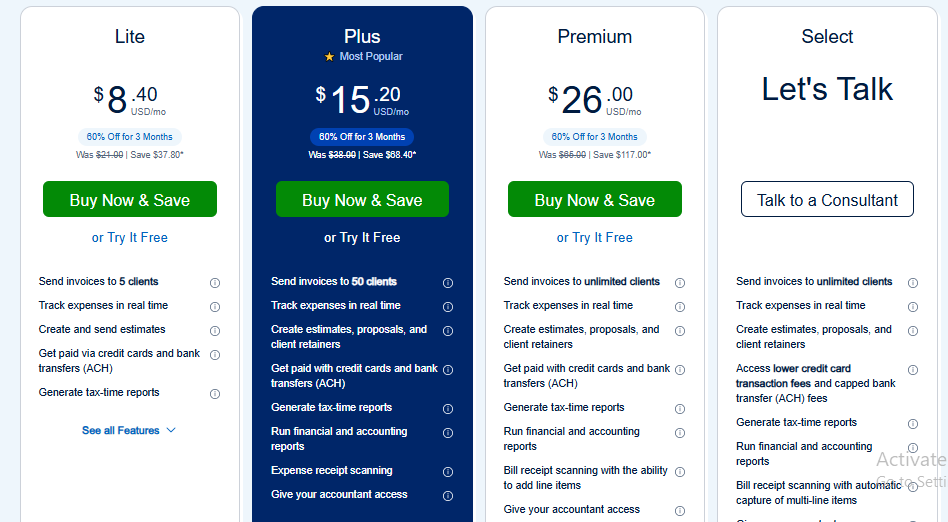
This is where FreshBooks receives the most mixed reviews. Unlike some competitors that charge based on features, FreshBooks tiers its pricing primarily based on the number of billable clients.
The “Add-on” Costs: It is important to note that adding team members (like a contractor or an employee) costs extra per month. Furthermore, if you use FreshBooks Payments (their version of Stripe) to accept credit cards, transaction fees apply, which are standard for the industry (roughly 2.9% + $0.30 per transaction).
No software is perfect. Here is the balanced view.
QuickBooks is the industry standard. It can do everything—inventory, complex payroll, massive datasets. However, it is clunky, hard to learn, and often “overkill” for a freelancer.
Xero is a favorite among accountants because of its clean reconciliation features. It is more user-friendly than QuickBooks but less intuitive than FreshBooks.
FreshBooks is not just software; it is a workflow philosophy. It assumes that as a small business owner, your time is better spent working for clients than wrestling with ledgers.
It is the ideal solution for:
It is NOT recommended for:
If you value your time and want an invoicing process that makes you look professional while requiring minimal effort, FreshBooks is the clear winner in the SaaS accounting space for 2024.
To ensure this review is grounded in fact, the following sources were consulted. You can use these links to verify pricing, user sentiment, and feature updates: