
Affiliate Disclosure: We believe in transparency. This article contains affiliate links. If you click on a link and make a purchase, we may earn a commission at no additional cost to you. This helps support our research and allows us to continue providing high-quality, unbiased reviews.
Is it possible to actually enjoy doing your taxes? In this comprehensive FreshBooks review, we discover that the answer is a resounding yes. Imagine this scenario: It is Friday afternoon. You have just finished a week of grueling work for a client. You are ready to close your laptop and start your weekend, but a nagging thought stops you cold—you haven’t sent the invoice. You open a messy Excel spreadsheet, try to remember how many hours you worked, struggle to format a PDF, and pray you didn’t mess up the formulas.
If this sounds familiar, you are suffering from “Administrative Paralysis,” a common affliction among freelancers and small business owners. Enter FreshBooks—a SaaS solution designed to cure this headache by moving you away from spreadsheets and into the cloud…
What is FreshBooks?
FreshBooks began in 2003, allegedly coded in a parent’s basement, born out of frustration with Word and Excel invoicing. Today, it is a cloud-based accounting SaaS (Software as a Service) designed specifically for freelancers, solopreneurs, and small service-based businesses.
Unlike competitors that were built for accountants first and business owners second, FreshBooks was built for the non-accountant. Its primary philosophy is “ridiculously easy to use.” However, in recent years, it has evolved from a simple invoicing tool into a robust double-entry accounting platform.
Core Features: The Engine Under the Hood
To evaluate the software properly, we must look beyond the marketing and test the functionality.
1. Invoicing (The Star of the Show)
Invoicing is FreshBooks’ bread and butter, and it shows. The interface for creating an invoice is “What You See Is What You Get” (WYSIWYG). You don’t fill out a form and hope the PDF looks good; you edit the invoice directly on the screen.
- Customization: You can easily change colors, fonts, and add logos to match your brand identity.
- Automation: This is a game-changer. You can set up recurring invoices for retainer clients. Even better, FreshBooks can automatically send payment reminders (chasing emails) to clients who are late paying, saving you the awkwardness of sending that “Just checking in…” email.
- Retainers: A newer feature allows you to bill for upfront time and track hours against that allotted bucket, a massive benefit for consultants and lawyers.
2. Expense Tracking and OCR
Receipt management is usually where small businesses fail. FreshBooks simplifies this with bank integration and OCR (Optical Character Recognition). When you snap a photo of a receipt using the mobile app, the system automatically scans the data (date, vendor, total amount) and logs it. It’s not perfect—faded receipts can sometimes trip it up—but it is accurate about 90% of the time.
3. Time Tracking
For service professionals who bill by the hour, an integrated time tracker is essential. FreshBooks allows you to:
- Start a timer on your desktop or phone.
- Log hours manually after the fact.
- The Killer Feature: You can instantly convert these logged hours into an invoice with one click. This ensures you never accidentally work for free because you forgot to bill a specific session.
4. Double-Entry Accounting
For years, the biggest criticism of FreshBooks was that it wasn’t “real” accounting. It was “single-entry.” That changed recently. FreshBooks now supports full double-entry accounting. This means it generates:
- Balance Sheets.
- General Ledgers.
- Trial Balances.
- Charts of Accounts. This is crucial because it means your accountant will actually be happy to work with your FreshBooks data at tax time, rather than asking you to migrate to QuickBooks.
5. Client Portal & Collaboration
FreshBooks provides a portal where your clients can log in to view their estimates, pay invoices, and save their credit card information for future auto-billing. This reduces friction in the payment process, which usually leads to getting paid faster.
User Interface (UI) and User Experience (UX)
If QuickBooks is a scientific calculator, FreshBooks is an iPhone.
The dashboard is clean, utilizing plenty of white space and friendly blue tones. When you log in, you are greeted with a snapshot of your financial health: Outstanding Revenue, Total Profit, and Spending.
The learning curve is virtually non-existent. The language used is plain English, not “Accountant Speak.” Instead of “Accounts Receivable,” it might say “Invoices to collect.” For a business owner with zero financial training, this approach is less intimidating and highly effective.
The Pricing Structure: A Critical Analysis
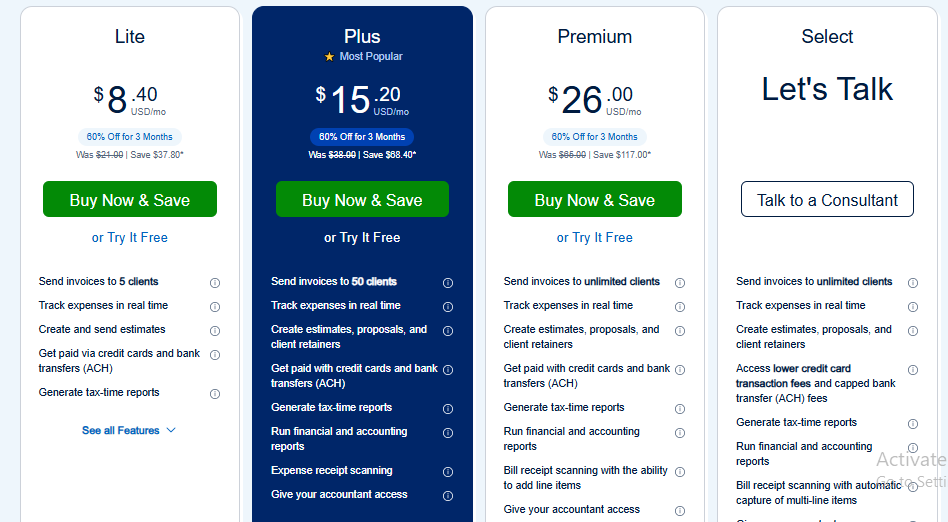
This is where FreshBooks receives the most mixed reviews. Unlike some competitors that charge based on features, FreshBooks tiers its pricing primarily based on the number of billable clients.
- Lite Plan: Supports up to 5 clients. Good for a side-hustler, but very limiting if you do many small, one-off jobs.
- Plus Plan: Supports up to 50 clients. This is the “sweet spot” for most full-time freelancers. It includes the double-entry accounting reports and mobile receipt scanning.
- Premium Plan: Unlimited clients. Necessary if you are an agency or a high-volume contractor.
The “Add-on” Costs: It is important to note that adding team members (like a contractor or an employee) costs extra per month. Furthermore, if you use FreshBooks Payments (their version of Stripe) to accept credit cards, transaction fees apply, which are standard for the industry (roughly 2.9% + $0.30 per transaction).
Pros and Cons: The Honest Verdict
No software is perfect. Here is the balanced view.
The Good (Pros)
- Best-in-Class Invoicing: It creates the most professional-looking invoices on the market with the least amount of effort.
- Superior Customer Support: FreshBooks is famous for their “Support Rockstars.” When you call, a human usually answers within a few rings. They do not bury you in automated phone trees.
- Ease of Use: You can genuinely set this up and send your first invoice in under 15 minutes.
- Mobile App: The app is fully functional, allowing you to send invoices and snap receipts from the road.
The Bad (Cons)
- Client Limits: The pricing model punishes you for having many small clients. If you have 51 clients who each pay you $50 once a year, you are forced into the expensive Premium tier.
- Inventory Management: While FreshBooks handles service-based billing beautifully, it is terrible for inventory. If you sell physical products (e-commerce), FreshBooks is likely not for you.
- Reporting Limitations: While it now has double-entry accounting, the reporting is not as granular or customizable as Xero or QuickBooks Online.
Comparison: FreshBooks review vs. The Giants
FreshBooks vs. QuickBooks Online
QuickBooks is the industry standard. It can do everything—inventory, complex payroll, massive datasets. However, it is clunky, hard to learn, and often “overkill” for a freelancer.
- Choose FreshBooks if: You sell time/services and want simplicity.
- Choose QuickBooks if: You sell physical products, have complex inventory, or have over 10 employees.
FreshBooks review vs. Xero review
Xero is a favorite among accountants because of its clean reconciliation features. It is more user-friendly than QuickBooks but less intuitive than FreshBooks.
- Choose FreshBooks if: You are doing the books yourself.
- Choose Xero if: You plan to hand everything off to an accountant immediately.
Conclusion: Who is FreshBooks For?
FreshBooks is not just software; it is a workflow philosophy. It assumes that as a small business owner, your time is better spent working for clients than wrestling with ledgers.
It is the ideal solution for:
- Creative Agencies (Marketing, Design, Web Dev).
- Freelancers (Writers, Photographers).
- Consultants and Coaches.
- Tradespeople (Plumbers, Electricians) who need mobile invoicing.
It is NOT recommended for:
- Retail stores.
- Large e-commerce operations.
- Businesses with hundreds of tiny, one-off transactions.
If you value your time and want an invoicing process that makes you look professional while requiring minimal effort, FreshBooks is the clear winner in the SaaS accounting space for 2024.
References and Resources for Further Reading
To ensure this review is grounded in fact, the following sources were consulted. You can use these links to verify pricing, user sentiment, and feature updates:
- Official Feature List & Pricing:
- FreshBooks Official Site: www.freshbooks.com/pricing
- FreshBooks Updates (Double Entry): www.freshbooks.com/blog/double-entry-accounting
- Third-Party User Reviews (Social Proof):
- G2 Crowd (User Ratings): www.g2.com/products/freshbooks/reviews
- Capterra Reviews: www.capterra.com/p/180/FreshBooks
- Trustpilot: www.trustpilot.com/review/freshbooks.com
- Professional Critic Reviews:
- PCMag Editors’ Choice Review: Search “PCMag FreshBooks Review 2024”
- Investopedia (Best Accounting Software for Self-Employed): Search “Investopedia Best Accounting Software”

jo